3DPrompt.
GitHub
Back to the library
Claude Opus 5Reference brief

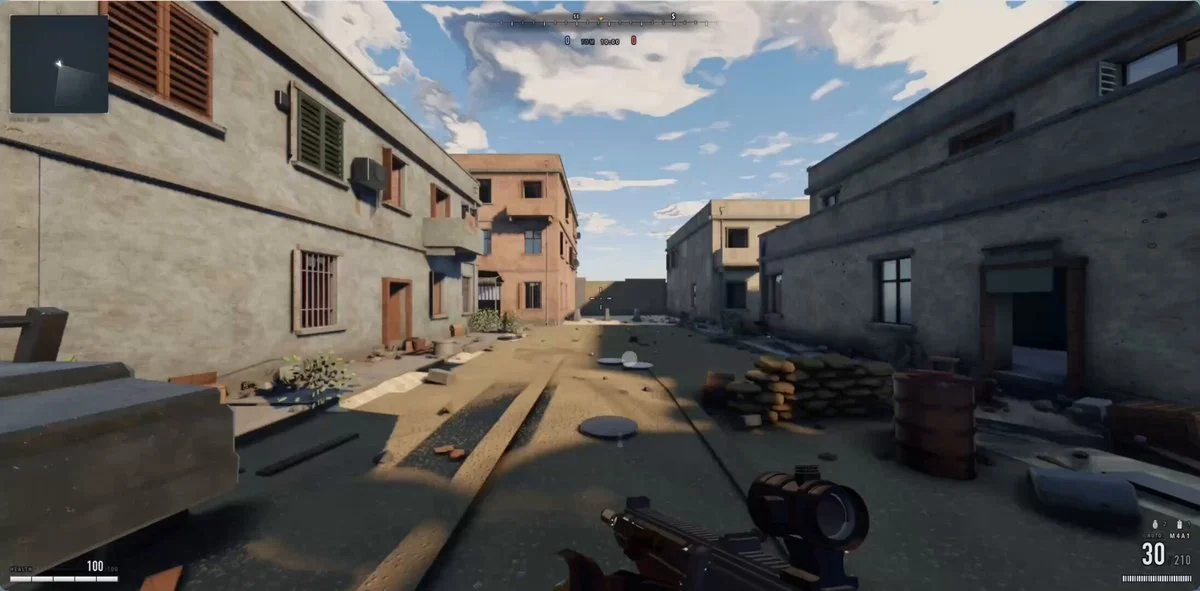
Claude Opus 5 AAA shooter game prompt

A reusable prompt for building a first-person shooter in ThreeJS with AAA-quality graphics, subagents, and iterative visual checks.
Created by Garry YuanView original source
Claude Opus 5 AAA shooter game prompt

About this example

A starting brief based on the creator's public project, not a verbatim original prompt. Your result will vary.

Claude Opus 5first-person shooterThreeJSAAA graphicssubagents

The prompt

Recently, the Call of Duty game created by Claude Opus 5 has been going viral, with the author claiming it was achieved with just one prompt. Many people are skeptical, and the author has directly open-sourced the code and prompt. I originally thought the prompt would be very complex, but it turned out to be just a short few hundred words. The key among them is the loop. Here is the prompt: "I want you to develop a first-person shooter game that reaches the level of the latest Call of Duty. It must be flawless, with stunningly beautiful graphics, from textures to physics effects—all the elements you can think of must reach AAA-level quality. You need to create multiple sub-agents and have each sub-agent handle every detail separately to ensure the game reaches perfection. You should /loop each project and have an independent sub-agent perform a visual inspection to ensure it reaches AAA-level standards. This independent sub-agent should be extremely strict; if it doesn't reach AAA-level standards, it should continue checking. Do not stop until every sub-agent, after comparing with the Call of Duty game, is utterly amazed by the game's graphics quality. It should be able to compare the two games side by side without even looking at the visuals and point out which one is better. Use ThreeJS to complete this work. /loop until the game reaches perfection. Create multiple sub-agents and use UltraCode for optimization."

How to use this prompt

01

Start with the right workspace

Open your preferred coding assistant or 3D tool. Use the model shown on the example as a starting point, and check any linked project for setup instructions.

02

Choose one thing to change

Swap the subject, art style or setting. Keep the camera and interaction clear. Build a small version first, then refine one detail at a time.

03

Give the scene its own assets

For a custom character or prop, create a 3D model from a short object description or reference image, then bring it into your project.

Previews belong to their respective creators. Check the original source and project license before reusing code or assets.