3DPrompt.
GitHub
Back to the library
Claude Opus 5.5Reference brief

Self-running 3D Rube Goldberg machine

Leo shared this full prompt as the identical one-shot instruction used with Opus 5.5 in Claude Code and GPT-6 Astra in Codex CLI. It requests a self-contained Three.js-rendered Rube Goldberg simulation with custom physics, an automatic cinematic sequence, and deterministic replay.
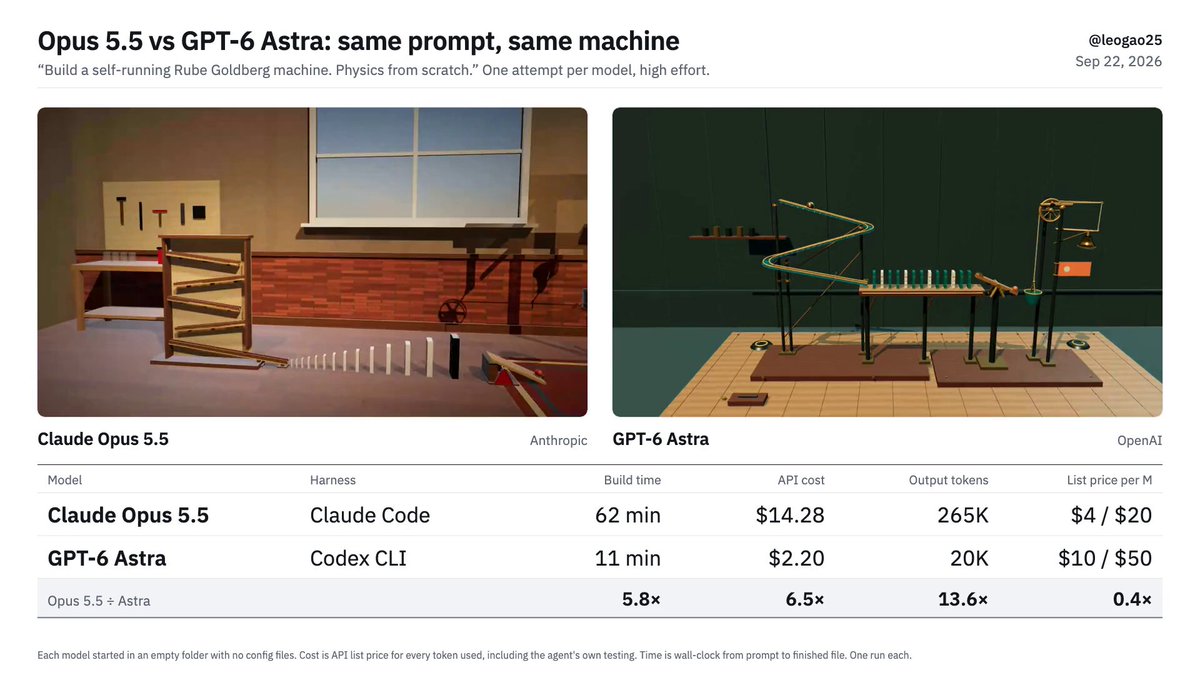
Created by leoView original source
Self-running 3D Rube Goldberg machine

About this example

A starting brief based on the creator's public project, not a verbatim original prompt. Your result will vary.

Rube Goldberg machine3D physicssimulationThree.jscustom physicsrigid bodiescollisionsrope and pulley

The prompt

Build a 3D Rube Goldberg machine that runs itself, as a single self-contained index.html in the current directory. The chain, in order: 1. A marble is released at the top and rolls down a series of zig-zag ramps. 2. It knocks over a line of at least 12 dominoes. 3. The last domino tips a seesaw, which launches a small ball into a hanging bucket. 4. The bucket's weight pulls it down; its rope runs over a pulley and yanks a bell, which visibly swings. 5. The same motion raises a flag up a pole. The flag reaching the top is the finish. Rules: - Write the physics yourself: no physics library. Every motion after the marble is released must come from your simulation (rigid bodies, collisions, constraints, rope/pulley). No keyframed animation or tweened motion of any machine part. - You may load three.js from a CDN for rendering. Nothing else external: no images, models, or fonts. - It must run with no user input: start automatically on page load, use a cinematic camera that follows the action, and complete the whole chain in about 15–20 seconds. After the flag is up, hold for 2 seconds, then reset and replay. - Deterministic: fixed timestep and no unseeded randomness, so every run looks the same. - Fill the browser window. It will be screen-recorded at 1280×720. - No on-screen text or UI of any kind. - Make it look good: lighting, shadows, materials, and a setting that makes it feel like a real contraption.

How to use this prompt

01

Start with the right workspace

Open your preferred coding assistant or 3D tool. Use the model shown on the example as a starting point, and check any linked project for setup instructions.

02

Choose one thing to change

Swap the subject, art style or setting. Keep the camera and interaction clear. Build a small version first, then refine one detail at a time.

03

Give the scene its own assets

For a custom character or prop, create a 3D model from a short object description or reference image, then bring it into your project.

Previews belong to their respective creators. Check the original source and project license before reusing code or assets.