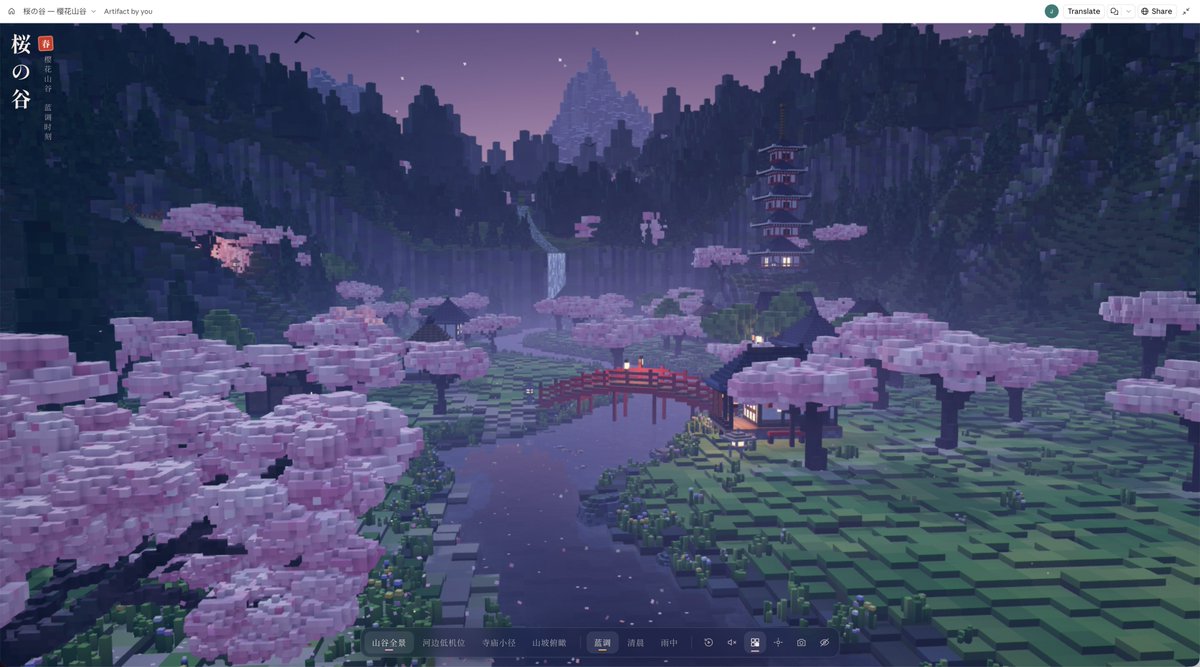
Interactive 3D Japanese Cherry Blossom Valley Web Experience
In a comparison post featuring Opus 5.5 (Figures 1–2) and GPT 6 Astra (Figures 3–4), the author published the complete prompt used to create a Japanese cherry blossom valley. The prompt calls for a realistic 3D landscape that can be explored in real time in a browser, with refined voxel art, four camera views, three atmospheres, touch and desktop interaction, performance modes, and pre-delivery validation.
A starting brief based on the creator's public project, not a verbatim original prompt. Your result will vary.
Japanese cherry blossom valley3D landscapeinteractive web experienceThree.jsWebGLvoxel artreal-time renderingbrowser-based 3D
The prompt
Create a polished 3D landscape web experience that can be explored and interacted with in real time in a browser.
Theme: Japanese cherry blossom valley.
Use HTML, CSS, and JavaScript. Do not generate images or provide only a design concept,
and do not fake 3D with a single background image and parallax effects. I need a working, explorable finished product.
【1. Creative Direction】
Create a complete, continuous valley landscape with clear depth across near and distant areas,
not an isolated prop, floating island, diorama with a base, or mere technical demo.
The style is modern, refined voxel art:
retain the visual language of cubic geometry, while keeping the image high-resolution, antialiased, and finely lit.
Do not use retro low-resolution pixelation, oversized block construction, or a pixel filter over the scene.
Prioritize visual quality. It is better to include fewer features than to sacrifice composition, materials, or lighting.
【2. How to Use Reference Images】
If reference images are provided, first understand their compositional layers, scale, lighting, and color relationships.
Use them only as inspiration for the atmosphere and visual language, then redesign the scene,
without copying the positions of the buildings, trees, mountains, or roads or recreating the image 1:1.
The reference image is not background material for the web page. The scene itself must be built from real 3D geometry.
【3. Scene Composition】
When opened, the page should immediately show a complete, compelling composition,
so users should not have to rotate the camera first to find a good angle.
Use a perspective camera, not an orthographic, diorama-style top-down camera.
The composition must have a clear foreground, midground, and background:
Foreground:
a prominent old cherry tree with rocks, grasses, plants, a stone lantern, and a few fallen blossoms,
creating a natural frame around the edge of the image without blocking the river, bridge, or main buildings.
Midground:
a winding river that leads the eye into the scene, crossed by a red wooden bridge;
a village, teahouse, shrine, and paths distributed along the terrain, with believable circulation between the buildings.
The ground must have elevation changes, shorelines, and natural transitions rather than models placed evenly on a flat plane.
Background:
a multi-tiered pagoda on the hillside, forests at varying distances, mountain ridges, and snow-capped mountains in the distance.
Show distance through changes in scale, occlusion, warm-to-cool shifts, and atmospheric perspective,
rather than simply shrinking distant objects.
Do not distribute every element evenly across the scene. Establish hierarchy, variation in density, negative space, and a clear visual focal point.
【4. Modeling and Image Quality】
Cherry tree:
the trunk should have bends, branches, forks, and visible roots; the canopy should consist of irregular clusters of blossoms,
with gaps, variation in thickness, and visible branches. Do not make it out of a few regular spheres or blocky clumps.
Architecture:
roofs should include layered tiles, eaves, beams, columns, and lattice windows;
different buildings should vary in purpose, scale, and height. Do not fill the valley with copies of the same house.
Terrain:
include wet rocks, grasses, and vegetation transitions along the banks.
Avoid overly regular steps, repeating stripes, checkerboard patterns, and obvious procedural grids.
Water:
the surface must reflect its surroundings, with moderate ripples, depth variation, and natural transitions at the banks.
Use real scene reflections wherever possible; when reducing quality for performance, keep the result visually convincing.
Do not substitute flickering noise, extreme distortion, or a solid blue plane for water.
Details:
you may include a few koi, fallen blossoms, fireflies, waterfalls, and distant birds,
but they should support the atmosphere without making the image feel cluttered.
Do not pile on details just to advertise a high model count.
【5. Color and Atmosphere】
The default atmosphere is blue hour:
cool-toned valleys and distant mountains, soft pink cherry blossoms, and warm but not overexposed lantern and window light.
Keep the warm light concentrated in inhabited areas; do not tint the entire environment orange.
Use soft shadows, contact shading, sensible exposure,
restrained bloom, antialiasing, and layered fog that conveys distance.
Avoid a washed-out or gray appearance, oversaturation, dense fog across the entire scene, overexposed lights, and obvious aliasing.
The cubic geometry can remain crisp, but the rendering itself must not look crude.
Also provide “Morning” and “Rainy” atmospheres;
when switching between them, update the sky, ambient light, fog, and local effects together,
rather than merely changing the background color.
【6. Interaction and Interface】
Provide four designed camera views:
valley panorama, low riverside angle, temple path, and hillside overlook.
Transitions should be smooth, and each view must have its own compositional value.
Basic interaction:
drag with the mouse to look around, and use the scroll wheel to zoom or move forward; support dragging and pinch-to-zoom on touchscreens.
Provide controls to reset the view, hide the interface, and save the current image.
Optional enhancements:
free exploration, a slow camera tour, and ambient sound.
Ambient sound must be off by default and play only after the user clicks to enable it.
Additional features must not reduce the quality of the default composition.
Keep the interface restrained and thoughtfully designed, with the landscape taking priority.
Place the title and control bar at the edges so they do not obscure the visual focal point.
On both desktop and mobile, buttons must stay within the viewport, text must not overlap, and all controls must remain usable.
【7. Engineering and Performance】
You may use Three.js / WebGL and version-pinned, mutually compatible CDN dependencies.
Prefer mature rendering capabilities instead of rewriting an entire engine for the sake of “zero dependencies.”
Keep the custom HTML, CSS, and JavaScript organized in a single HTML file wherever practical.
Generate the scenery with procedural geometry and materials; do not depend on external images or 3D model assets.
Use suitable batching or instanced rendering for repeated objects;
manage subdivisions, shadows, reflections, and render resolution appropriately.
Provide high-quality and lightweight modes, with lighter settings enabled by default on mobile.
Do not pursue detail by endlessly increasing the voxel count.
Include a loading indicator, a message when WebGL is unsupported, and necessary error handling.
Do not autoplay audio when sound has not been enabled; respect the system preference for reduced motion.
【8. Pre-Delivery Validation】
Do not deliver immediately after writing the code.
If the current environment supports running a browser and taking screenshots, open the page first,
check the default camera, all four views, atmosphere switching, and desktop and mobile layouts,
then correct obvious composition, exposure, occlusion, and rendering issues based on the screenshots.
Pay particular attention to:
blank screens, failed loading, and console errors;
intersections, flickering, shadow acne, overexposure, and abnormal water;
whether the default view truly looks like a complete landscape rather than a small diorama;
and whether the feature buttons actually work and stay within bounds on mobile.
You may use browser screenshots for validation, but do not call image-generation tools.
State honestly which tests were not completed; do not claim that they have been verified.
Final deliverables:
1. An actual, openable HTML file or an interactive preview supported by the current environment.
2. If screenshots are possible, include one real screenshot of the browser rendering.
3. A brief explanation of the controls and any required runtime conditions.
Complete the build directly; make consistent design decisions for noncritical details yourself,
rather than repeatedly asking me to decide implementation issues you can resolve independently.
How to use this prompt
01
Start with the right workspace
Open your preferred coding assistant or 3D tool. Use the model shown on the example as a starting point, and check any linked project for setup instructions.
02
Choose one thing to change
Swap the subject, art style or setting. Keep the camera and interaction clear. Build a small version first, then refine one detail at a time.
03
Give the scene its own assets
For a custom character or prop, create a 3D model from a short object description or reference image, then bring it into your project.
Previews belong to their respective creators. Check the original source and project license before reusing code or assets.