3DPrompt.
GitHub
Back to the library
Claude Opus 5.5Reference brief

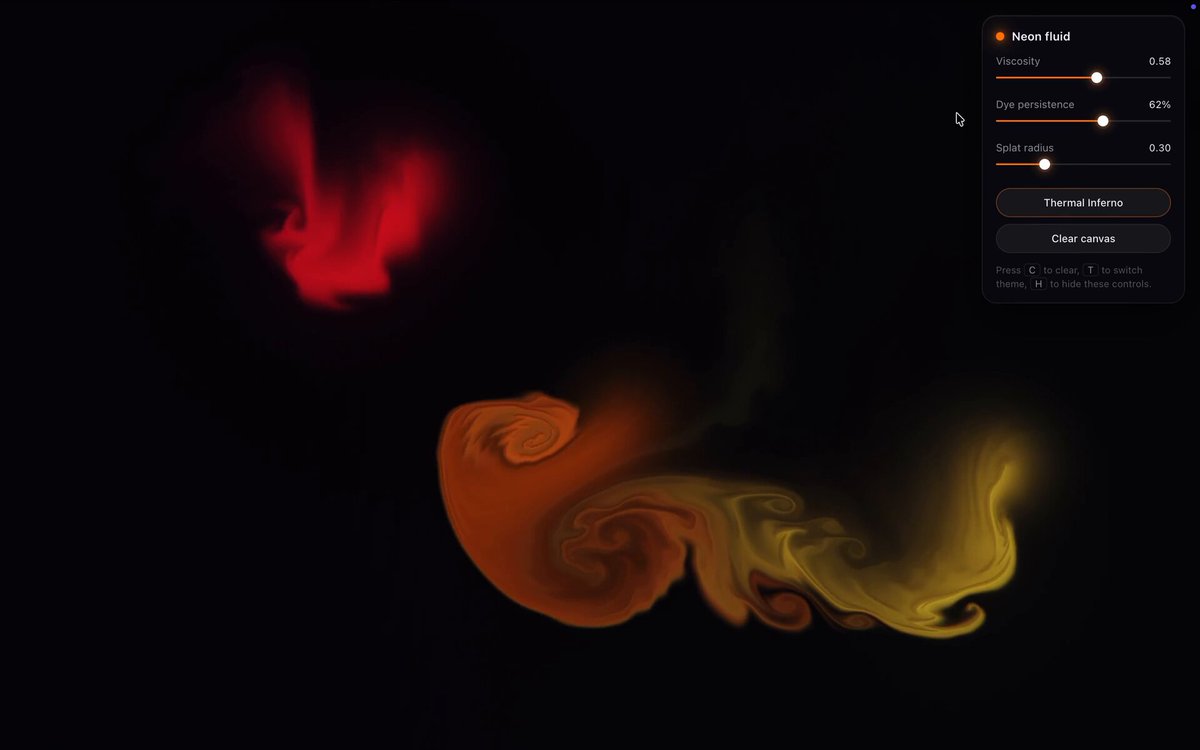
Interactive Eulerian Neon Fluid Simulation

A reusable one-shot prompt shared by the author as the exact prompt used for the displayed GPU neon fluid simulator. The root post explicitly attributes the simulator to Opus 5.5. It requests a dependency-free, single-file WebGL fluid simulation with GPU FBO passes, neon dye interaction, ambient vortices, and a glassmorphism control HUD.
Created by theailoserView original source
Interactive Eulerian Neon Fluid Simulation

About this example

A starting brief based on the creator's public project, not a verbatim original prompt. Your result will vary.

WebGLfluid simulationEulerian simulationGPUGLSLneon smokeinteractivevorticity confinement

The prompt

Write a complete, single-file HTML document containing a high-performance, GPU-accelerated interactive Eulerian Neon Fluid Simulation. Strict Technical & Aesthetic Requirements: 1. Architecture & Performance: - Single-file: All HTML, CSS, and JavaScript/GLSL shaders inline. - Zero external dependencies: Pure WebGL 1.0 or 2.0 (no Three.js, no Pixi, no external libraries). - GPU-Computed Fluid Dynamics: The simulation must run entirely via ping-pong Framebuffer Objects (FBOs) using custom fragment shaders for: a) Advection (velocity & dye) b) Divergence calculation c) Pressure Poisson solver (Jacobi iteration, 20-30 iterations per frame) d) Gradient subtraction / velocity projection e) Vorticity confinement (adds turbulent swirls and prevents the fluid from turning into dull, blurry mush). 2. Visual Fidelity (The "Neon Smoke" Look): - Pitch-black void background (`#050508`). - Additive / High-Dynamic-Range blending for dye injection. - Dynamic palette: Each cursor flick or touch drag injects high-luminosity neon dye that cycles smoothly through vivid cyber hues (electric cyan `#00F0FF`, hot magenta `#FF007F`, deep ultraviolet, and radiant gold). - Display shader enhancements: Include a post-processing pass directly in the final render shader that applies subtle bloom/glow, tone mapping, and chromatic aberration around the swirling edges of the fluid. 3. Interaction: - Mouse & Touch: Rapid cursor movement or dragging injects velocity proportional to mouse speed, along with dense glowing dye. - Passive Ambient Motion: When idle, generate subtle procedural curl noise or gentle drifting vortices so the canvas is never completely static. - Controls: A sleek, ultra-minimal glassmorphism HUD tucked into a corner (with auto-hide on inactivity): * Viscosity slider * Dye dissipation / persistence slider * Splat radius slider * "Clear Canvas" button * Toggle button to cycle color themes (Cyberpunk, Thermal Inferno, Bioluminescent Deep). 4. Production Polish: - Automatically handle high-DPI displays and `resize` events without stretching or clearing the FBO textures. - Graceful fallback check for floating-point texture support (`OES_texture_float` / `OES_texture_half_float`). - Clean, bug-free, fully implemented code with zero placeholders or truncated comments. Return only the fully populated HTML file ready to run directly in Chrome/Safari/Firefox.

How to use this prompt

01

Start with the right workspace

Open your preferred coding assistant or 3D tool. Use the model shown on the example as a starting point, and check any linked project for setup instructions.

02

Choose one thing to change

Swap the subject, art style or setting. Keep the camera and interaction clear. Build a small version first, then refine one detail at a time.

03

Give the scene its own assets

For a custom character or prop, create a 3D model from a short object description or reference image, then bring it into your project.

Previews belong to their respective creators. Check the original source and project license before reusing code or assets.