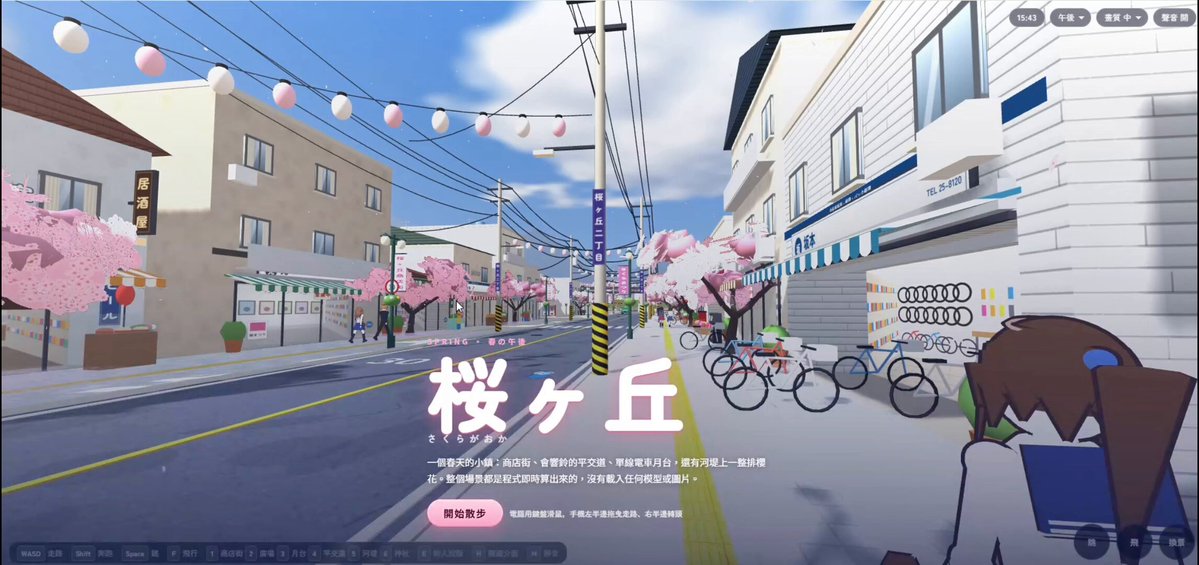
Freely walkable 3D anime-style cherry blossom town
A detailed Three.js prompt for a shareable single-file, freely walkable 3D anime-style Japanese spring town. It specifies a shopping street, railway crossing and station, sakura plaza, Inari shrine, riverside levee, procedural cherry trees, animated people and vehicles, time-of-day modes, collision, desktop and mobile controls, and generated ambient audio. The root post explicitly says the author built the work using Claude Opus 5.5 and Three.js; the complete instruction is supplied in the author's verified comment.
Please use Three.js to build a "freely walkable 3D anime-style cherry blossom town" as a single HTML file, then publish it as a shareable web page.
[Technical constraints]
- Use only three.js r128 (UMD build) from cdnjs. Do not load any external models or images — generate all models, textures, and shop signs procedurally with code and Canvas.
- Use original content for all shop names, signs, and characters. Do not imitate any real brand or existing work.
- Use MeshStandardMaterial or MeshPhongMaterial. Avoid high metalness and environment reflection maps (on some computers they make objects render with no color).
- Merge static objects by material into a small number of meshes so it runs on ordinary computers; provide a High / Medium / Low quality switch.
[Scene: "桜ヶ丘 (Sakuragaoka)", a small Japanese town on a spring afternoon]
1. Shopping street: a north–south main street with 20+ shops on both sides (ramen shop, café, bicycle shop, bookstore, florist, Japanese sweets shop, drugstore, convenience store, etc.). Each shop has: a multi-line sign (shop name + English name + phone number), a striped awning with a scalloped valance, a recessed storefront with an interior that has visible depth, and a sidewalk display (fruit crates, magazine rack, food-sample case, a spinning barber pole). Upper floors have windows, AC units, balconies with hanging laundry, and rooftop TV antennas.
2. Street details: utility poles with lots of overhead wires, decorative street lamps with shopping-street banners, festival lantern strings, square sidewalk tiles with yellow tactile paving, drain grates, "止まれ" stop signs, and a bus stop.
3. Level crossing and trains: a double-track railway. When a train approaches, the crossing's red lights flash alternately, the bell rings, and the gates lower. A two-car commuter train stops at the station for about 14 seconds and then departs. The windows are transparent, so the seats and hand straps inside are visible.
4. Island-platform station: station name board, platform canopy, benches, and a vending machine.
5. Sakura plaza: a 100-year-old cherry tree with a circular bench around it.
6. Inari shrine: a large vermilion torii plus a row of small torii, stone lanterns, fox statues, a worship hall (copper-green roof, chigi, katsuogi, offering box, hanging bell), a purification fountain (temizuya), jizo statues, ema plaques, a sacred tree, and gravel ground.
7. Riverside levee: two rows of cherry trees forming a blossom tunnel, lanterns, a river, houses on the far bank, and distant mountains.
[How to build the cherry trees (key part)]
- Model them on Somei-Yoshino: the trunk splits low into 3–4 main limbs, which branch recursively three more levels. Branches spread outward and droop slightly at the tips, giving an overall umbrella shape.
- Build the canopy from tens of thousands of "blossom cluster cards": draw five-petal flowers on Canvas (notched petal tips, reddish centers, stamens) with a soft pink base layer behind the flowers. Use alphaTest and double-sided rendering for the cards.
- Add a few pink filler clumps inside the canopy for volume. The outer and upper parts are brighter; the inner and lower parts have warm rose-toned shadows.
- Use pale pink, not neon pink. The canopy sways gently in the wind, a carpet of fallen petals covers the ground under each tree, and petals keep falling through the air (done in a shader).
[Characters]
- 20+ anime-style students and townspeople: walking animation with knee and elbow joints, anime faces drawn on Canvas (large eyes, highlights, blush) that blink, bangs made of separate strands, a variety of hairstyles (long, bob, swinging ponytail, twin tails), sailor uniforms / blazer uniforms / casual clothes. Render characters with two-tone cel shading and a dark outline.
- People walk along the street, chat in the plaza, wait on the platform, pray at the shrine, and ride bicycles along the levee.
[Vehicles]
- Build cars by extruding a side-profile silhouette (with wheel arches, windows, lights, Japanese license plates, and spinning wheels). Cars stop before the level crossing, and while the bell is ringing they wait until the gates rise.
[Lighting and time of day]
- A soft anime-background look: blue sky with white clouds (shader), light haze in the distance, and shadows with a blue-violet tint.
- Switchable between Afternoon / Dusk / Night Sakura. At night, windows, lanterns, and street lamps light up.
[Controls]
- First-person: WASD to walk, Shift to run, Space to jump, F to fly, mouse to look around (pointer lock), number keys to teleport to each location, H to hide the UI, M to mute.
- Mobile: drag on the left half to walk, drag on the right half to look around.
- Collision is enabled, and the player can walk up onto the platform and steps.
- Use Web Audio to generate ambient sound: wind, birdsong, the level-crossing bell, and train running sounds.
How to use this prompt
01
Start with the right workspace
Open your preferred coding assistant or 3D tool. Use the model shown on the example as a starting point, and check any linked project for setup instructions.
02
Choose one thing to change
Swap the subject, art style or setting. Keep the camera and interaction clear. Build a small version first, then refine one detail at a time.
03
Give the scene its own assets
For a custom character or prop, create a 3D model from a short object description or reference image, then bring it into your project.
Previews belong to their respective creators. Check the original source and project license before reusing code or assets.