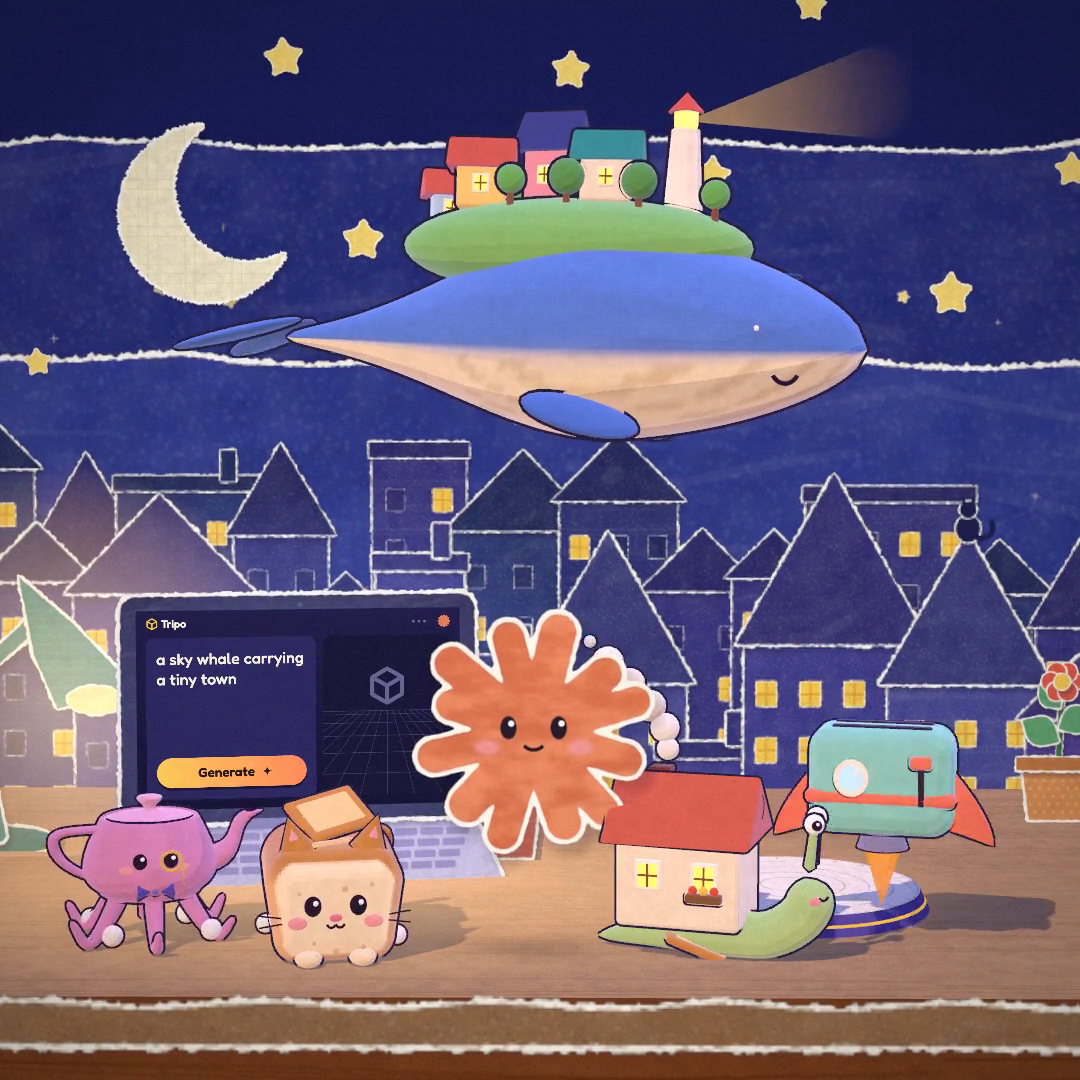
A paper-cut-style promotional film for Tripo 3D, made with Claude Opus 5 using Three.js. Watch five whimsical creations come to life, explore the 3D assets exported from the animation, and use the prompt to recreate it.
Created by tripo3d
About this example
A starting brief based on the creator's public project, not a verbatim original prompt. Your result will vary.
The creator confirmed this is a promotional film for Tripo 3D made with Claude Opus 5. The reconstruction prompt is based on the supplied claude-tripo source project, technical explanation and finished video. The original short generates its geometry, textures and sound procedurally; its on-screen Tripo generation sequence is a shader animation, not a Tripo API call. The five downloadable GLBs are static exports from that source with portable materials, not models generated by Tripo.
Claude Opus 5Tripo 3Dpromotional filmThree.jspaper-cut animationprocedural animation
The prompt
1. Project goal
Build an interactive, roughly 44-second animated short titled “Claude × Tripo.” A small orange Claude spark lands on a handmade paper desk, sketches or types five playful ideas into a Tripo-branded laptop, and meets the creations as they come to life. The visitor watches, pauses, scrubs, replays, changes aspect ratio, enables sound, or records the animation. This is a choreographed short, with no score, combat or win condition. Reproduce the supplied video and scene composition.
2. Visual style
Use a layered paper-cut diorama with torn cream edges, gouache grain, scribbles, graph-paper details and a midnight-blue sky. Layer a crescent moon, warm yellow stars, blue paper hills and a little town behind a kraft-paper desk. Place the open laptop on the left, Claude near the center and a small circular display platform on the right. Keep warm orange, lilac, mint, butter-yellow and cream accents. The perspective camera moves gently between wide shots and closeups; depth-separated flat cutouts create parallax. Use stepped cartoon lighting, cool rim light, restrained outlines, soft shadows and a final paper-grain/vignette pass. End with a white camera flash and a slightly tilted, taped polaroid of the whole cast. Match the reference framing at the opening, each creation reveal and the ensemble finale.
3. Scene and story
Drive every pose and camera from a single deterministic update(t), so seeking directly to any timestamp produces the correct frame without replaying earlier frames. Name the story beats in one shared schedule. Claude arrives around 0.55 seconds, lands around 1.7 seconds, and wakes the laptop at 2.92 seconds. Reveal the bread cat around 7.2 seconds, the snail cottage around 13.85 seconds, the toaster rocket around 19.8 seconds, the teapot octopus around 26.1 seconds and the sky whale around 33.3 seconds. The rocket launches around 21.25 seconds and returns around 24.05 seconds. The whale swims above the ensemble around 35–37 seconds. The camera flash occurs at 40.5 seconds; finish at 44.2 seconds. Blend camera shots and use eased anticipation, spring overshoot, squash/stretch, small hops and decaying wobbles. Avoid abrupt resets when moving between scenes.
4. Asset list
- claude-spark: a flat orange twelve-ray spark with cream torn rim and a friendly animated face. Blink, look at the current action, smile, blush and use happy, dizzy and sparkle eyes. Two rays stretch into arms that reach keys, drawings and other characters. Preserve its face and arm behavior as a procedural shader; a static export does not capture this character's identity or acting.
- cat: a golden bread-loaf cat with rounded body, baked crust marks, little ears, paws, tail, glossy eyes, pink cheeks and whiskers. It appears on the display platform, rotates for inspection, receives a pat and settles at the front of the desk.
- snail: a pale-green snail carrying a cream cottage with coral roof, chimney, glowing windows and a tiny flower box. Keep its eyestalks distinct, house upright and face visible during the lift and slide.
- toaster: a mint toaster with coral trim and lever, rounded cream details, small rocket fins and an underside nozzle. It lifts off with orange flame, puff trails and a passing-camera sound, then returns. Flame and smoke remain separate effects.
- octopus: a pink/lilac teapot creature with six flexible tentacles, spout and handle, cheerful face, gold monocle and purple bow tie. Animate the tentacles, a tipping gesture and a little walk. Keep tentacle posing distinct from the rigid teapot body.
- whale: a blue sky whale with cream belly, fins and expressive face, carrying a grassy miniature town, colorful cottages, trees and a striped lighthouse. It is the largest creation and must remain prominent in the finale. The lighthouse beam is a separate transparent effect.
- environment: desk, laptop, lamp, pencil cup, potted plant, display platform, paper sky/town layers, notes and pencil. Reuse these throughout. Paper backgrounds, laptop UI, doodles, particles, smoke, light beams and postprocessing remain procedural.
Keep stable asset identifiers and separate transforms for world placement, spin/squash and articulated parts. Preserve the source project's proportions and colors. Portable GLB versions may use standard materials and a static pose; do not claim that they include the custom reveal shader, acting or full animation.
5. Interaction and feedback
Provide play/pause, replay, a seek slider with elapsed/total time, 1:1 / 16:9 / 9:16 aspect choices, a sound toggle, a clean view and recording. Space toggles playback; R replays; H or C toggles the clean view; Escape restores controls; M toggles sound; left/right seek by one second and Shift reduces the step to 0.1 seconds. Make controls usable on a narrow touch screen. Sound must start only after a user gesture; offer “Play with sound” when autoplay audio is blocked. Scrubbing and replay restart sound at the correct time. At the end, stop and offer replay.
The laptop displays the current drawing or typed idea, an animated progress bar and a completion mark. The on-screen Generate action is part of the authored animation: the existing short uses procedural geometry and does not call a model-generation API. Reveal each creation bottom-up, initially as lilac clay, then paint in its color with a warm glowing scan band. Coordinate Claude's gaze and arms with these events.
6. Technical implementation and audio
Use JavaScript ES modules and Three.js r170 with WebGL, custom shaders, CanvasTexture and the Web Audio API. Bundle the application and fonts as same-origin static resources with a reproducible build; no runtime CDN or private service credentials. Use local Fredoka for controls and Caveat for handwritten text. Adapt camera distance and render size to all three aspect ratios, cap excessive pixel density, and keep exports out of the page's initial network requests.
Synthesize the score and effects in Web Audio. Use a music-box FM voice, plucked filtered-triangle bass, marimba, soft detuned pad, kick, clap/shaker, generated reverb and final compression. Align bar zero with the laptop wake at 2.92 seconds and bar sixteen with the flash at 40.5 seconds, giving approximately 102 BPM; cycle F–Dm–B-flat–C. Add pencil, keyboard, whoosh, pop, boing, cat, whale, rocket and shutter effects at named story beats. Pan and shape the rocket engine using its camera-relative motion. Render the soundtrack in small offline slices and assemble one buffer; the active audio clock drives the picture with a fallback when it stalls. Recording should combine the canvas video with the soundtrack and export a browser-supported format. Do not depend on the source project's optional local Python capture server for normal playback or browser recording.
7. Completion criteria
Deliver editable source, fixed dependencies, a static build, startup instructions and the usable short. Verify direct seeking near 8, 15, 22, 28, 36 and 41 seconds; replay and pause must preserve deterministic state. Compare the ensemble composition with the reference video. Confirm audio unlock, mute, replay synchronization and an actual recording download with both tracks. Check square, landscape and portrait framing plus desktop and narrow-screen controls. Validate the hosted page inside the parent site's isolated iframe, with no missing fonts, blocked scripts or external-resource errors. Check reusable GLBs independently for correct geometry, orientation, materials and bounding box; their covers must depict the actual files. Document any differences between portable assets and the animated shader version.
How to use this prompt
01
Start with the right workspace
Open your preferred coding assistant or 3D tool. Use the model shown on the example as a starting point, and check any linked project for setup instructions.
02
Choose one thing to change
Swap the subject, art style or setting. Keep the camera and interaction clear. Build a small version first, then refine one detail at a time.
03
Give the scene its own assets
For a custom character or prop, create a 3D model from a short object description or reference image, then bring it into your project.
Previews belong to their respective creators. Check the original source and project license before reusing code or assets.