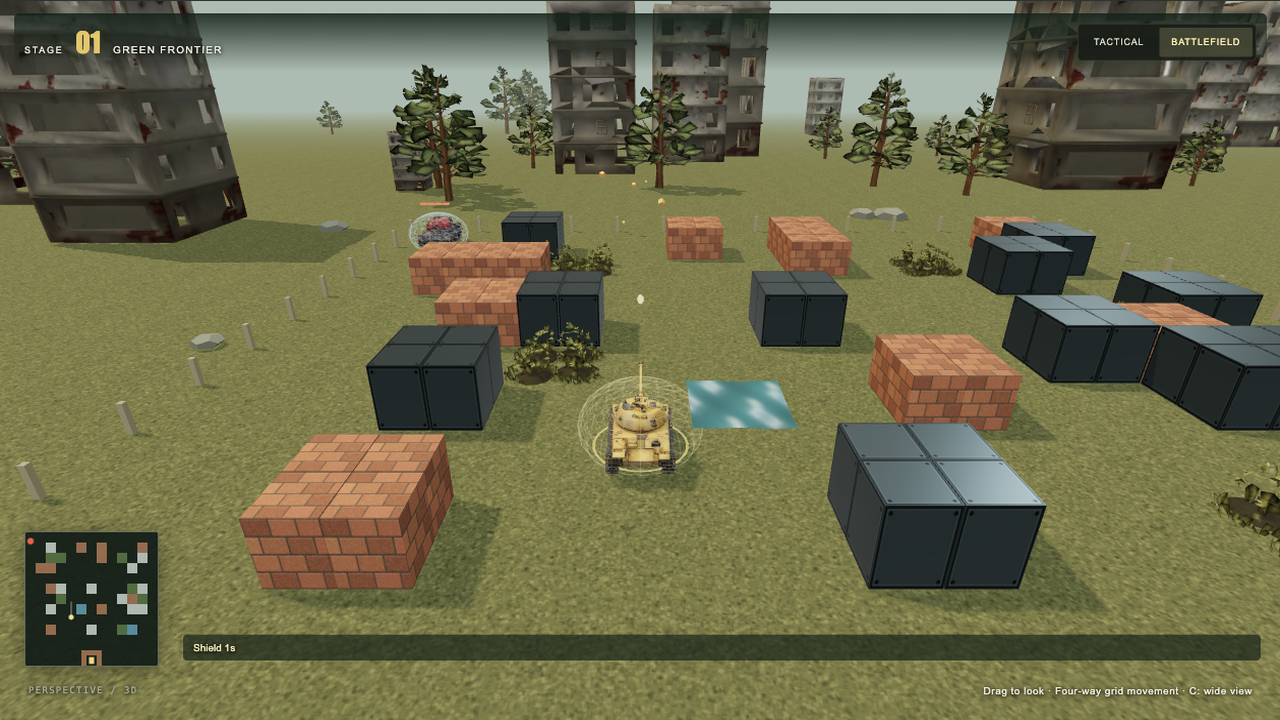
Defend the eagle across endless grass, snow and industrial battlefields or 35 classic maps. Collect ten supplies and defeat heavy enemy tanks that take four hits to destroy.
A starting brief based on the creator's public project, not a verbatim original prompt. Your result will vary.
Reconstruction specification derived from the locally authored Three.js project at runtime commit 670383f86f56c61e29e10d12424addf6f8defbe9 and verified public gameplay. Independent fan tribute to Battle City (1985, Namco). Classic map/wave data: gunnerson/battlecity (MIT); collected audio: JustoSenka/BattleCity (MIT repository). Seventeen models generated with Tripo P2. This is a project-derived specification, not a verbatim original generation prompt.
Battle City3D tank gameThree.jsTripotank defenseprocedural maps
The prompt
1. Project goal
Build Battle City 3D, a browser tank-defense game inspired by the 1985 Famicom classic. The player drives a tank, destroys a wave of 20 enemies, collects supplies and protects the eagle headquarters. Reconstruct the current perspective-3D version shown in the reference media, including an endless seeded campaign and 35 selectable classic layouts. Preserve the readable arcade rules while giving tanks, walls and scenery genuine depth.
2. Visual style
Use a Three.js PerspectiveCamera with a 60-degree field of view. The default battlefield view sits behind and above the player, around 13 world units away at elevation 0.43 radians. Smoothly follow position and a point ahead of the tank; never rotate the camera automatically when the tank turns. Offer a higher tactical view, manual drag orbit and wheel zoom. Use the four cardinal map axes for movement and firing. After orbiting, map directional keys to the nearest cardinal direction relative to the camera; never turn keyboard input into diagonal movement. Render the chassis heading immediately to match the shot direction, and calibrate projectile and muzzle-flash height to the actual cannon of each model.
Use grounded tracked tanks, metallic turrets, terracotta bricks, dark steel blocks, blue water, low foliage and reflective ice. Continue the ground beyond the playable area into trees, ruined buildings and haze. Use warm directional light, soft shadows, ambient fill, ACES tone mapping and restrained muzzle flashes, recoil, sparks and bouncing debris. Snow changes the ground and tree palette; industrial stages favor steel and ruined buildings.
Frame the game with a dark olive command interface, warm yellow primary action, score, shared lives, remaining enemy icons, stage name and radar. Put the large Tripo 3D / Three.js model switch above the battlefield, showing the selected mode and a rotating tank preview. Use a localized illustrated supply guide and timed-effect indicators. Keep the playfield and essential touch controls visible on narrow screens.
3. World and scenes
Represent the battlefield as a 26 by 26 tile grid, with a tank collision half-width of 0.72. Place the eagle at (13,25), surrounded by a destructible U-shaped brick defense. Player spawns are (9,25) and (17,25); enemy gates are (1,1), (13,1) and (25,1).
Provide two campaigns: all 35 classic layouts with their 20-enemy wave tables, and an endless seed-based generator cycling grass, snow and industrial biomes. Generate connected corridors wide enough for the full chassis, with passable connections between player spawns, enemy gates and pickup locations. Add staggered central steel cover to prevent a direct spawn-to-eagle firing lane while retaining cross-street access. Allow selecting the starting biome or classic stage and rerolling a random map. Carry the run seed, score, lives and surviving players' upgrades into the next stage.
Brick is destructible; steel blocks ordinary shells and tanks; water blocks tanks but allows shells to pass; foliage conceals enemy models; ice reduces traction. Keep the distant environment decorative, separate from gameplay collision.
4. Asset inventory
Use these stable, independently replaceable 3D model slots. Prioritize the player, enemy, heavy tank and eagle, then all ten supply models. Ground each asset at its lowest point and normalize its facing, center and scale. Reuse templates instead of loading a model per enemy.
- player: a mustard-yellow tracked tank with a readable turret and forward cannon; used by player tanks, with a separate ring color for the second player.
- enemy: a compact tracked enemy tank, reused with distinct tints for basic, fast and powerful variants.
- heavy: a visibly heavier armored tank, separate from the standard enemy mesh, with four visible armor segments above it.
- eagle: a metallic golden eagle statue on the headquarters pedestal.
- pickup-star: a gold five-point upgrade star.
- pickup-helmet: a protective military helmet for temporary shielding.
- pickup-clock: a readable clock for freezing enemy movement.
- pickup-shovel: a shovel for headquarters reinforcement.
- pickup-life: a miniature tank representing one extra life.
- pickup-grenade: a hand grenade for destroying active enemies.
- pickup-ammo: an ammunition box for rapid fire.
- pickup-repair: a repair toolbox for restoring armor.
- pickup-magnet: a horseshoe magnet for ranged pickup collection.
- pickup-boost: an energy battery for a temporary speed boost.
- environment-building: a weathered ruined apartment building, Tripo P2.0, requested budget 1,800 triangles.
- environment-tree: an irregular pine with visible trunk, Tripo P2.0, requested budget 1,100 triangles.
- environment-bush: a low leafy shrub and grass tufts, Tripo P2.0, requested budget 650 triangles.
Display supplies as rotating, hovering collectible models with colored rings and matching guide thumbnails. Render repeated buildings, trees and bushes with shared geometry/material instances. Ground the building and tree roots; bury the shrub base slightly to blend with terrain. Add snow on upward-facing surfaces in snow stages. Keep tile walls, water, ice, projectile meshes, UI, lights, particles and collision proxies procedural. Animate water with world-space flowing waves, changing normals and small surface displacement, continuous across adjacent tiles. The Tripo version uses 17 generated models; the comparison version switches both tanks and environment to code-built geometry with the same rules and collisions. Both are rendered with Three.js.
5. Gameplay and feedback
Support solo and local two-player co-op with a shared pool of three lives. Solo uses WASD or arrow keys and Space/J to fire. In co-op, player one uses WASD and Space/J; player two uses arrows and Enter/Numpad 0. P/Escape pauses; C changes camera; 1/2 selects model mode. On touchscreens, allow holding a directional pad and fire button simultaneously, release input on pointer cancellation, and expose pause, resume, next-stage and retry actions without scrolling.
Player speed is 4.2 units per second, or 6.3 with boost. Enemies include basic, fast, powerful and heavy types; heavy tanks have four hit points and survive the first three unshielded hits. Use four concurrent enemies in solo and six in co-op, with staggered spawning. Killing a type awards 100, 200, 300 or 400 points; collecting any supply gives 500 points. Clear a stage after 20 enemy defeats. Lose when the eagle is destroyed or the shared lives are exhausted with no surviving player. Offer immediate retry, explicit next-stage progression and a locally saved best score.
Implement all ten supplies: star upgrades through three levels (faster shells, two simultaneous shells, then steel-breaking shells); helmet shields for 12 seconds; clock freezes enemies for 9 seconds; shovel reinforces the base for 16 seconds; mini tank adds one life; grenade destroys active enemies; ammunition grants 14 seconds of rapid fire with up to four active shells; repair adds two hit points capped at three; magnet collects visible supplies within five units for 20 seconds; boost lasts 12 seconds. Supply models last 25 seconds and appear at reachable locations, with a shuffled deck to vary types. Magnet collection must respect solid obstacles.
Use collected NES-style samples for the 4.333-second stage opening, firing, driving and idling, brick/steel impacts, enemy/player explosions, supply appearance and collection, extra life, armor hit, ice, pause and game over. The current project uses 15 OGG cues from JustoSenka/BattleCity, commit 3a07004ba8e53baea74ff70d2ecc22b017eb9b20. Preserve their attribution and repository license notice; describe them as collected remake audio, without claiming a bit-perfect hardware capture. Unlock audio on user gesture, calibrate sample gains, provide volume/mute, and synchronize sounds to events. Do not add unrelated continuous battle music.
6. Technical implementation
Use TypeScript, Three.js 0.180.0 and Vite 7, with an isolated package.json and lockfile. Keep the simulation independent of rendering, stepping at 120 Hz. Use solid chassis AABBs, axis-separated motion, boundary and tank separation, and continuous nearest-contact shell sweeps, including relative-motion collision between opposing shells. Shells originate at the chassis and sweep forward to prevent point-blank wall clipping. Add ice acceleration/deceleration and gravity with damped bounces for debris. These are arcade ground physics, not a suspension simulator.
Load same-origin GLB assets through GLTFLoader. Keep collision proxies independent of asset geometry. The current runtime uses quantized attributes and WebP textures (1024 px for vehicles/base; 512 px for supplies and environment), without geometry simplification or a WASM decoder. Limit loading to four workers, use hash-versioned URLs and 256 KiB ranges with a 20-second timeout and up to three attempts per range. Unlock play after the four core models and audio are ready; load supplies and environment assets in the background and only spawn supply types whose models are ready. Switching model mode preserves gameplay state.
Provide English, simplified Chinese, Japanese and Korean UI. Select a default from device language, except zh-TW, zh-HK, zh-MO and zh-Hant default to English; persist explicit language choices. Support keyboard, desktop pointer and multitouch, and pause on focus loss. Keep all assets, credits and reproducible scripts local to the source project, and ship a static dist directory with no private credentials or runtime backend dependency.
7. Completion criteria
Deliver editable source, asset provenance and license notices, an npm development/build workflow and a playable static preview. Verify the default Tripo scene, the model comparison, all biomes, a heavy tank taking four hits, every supply effect, pause/resume, defeat/retry and stage progression. Test 1,000 seeded maps for chassis-width connectivity and safe spawns, plus all classic maps, wall tunneling, diagonal shots, tank separation, ice momentum, camera-relative input at multiple yaws, and state-preserving mode switches. Validate localized UI and narrow-screen two-finger controls without claiming physical-device testing when only emulation was used. Compare actual start and combat frames with the reference images/video; confirm all 17 models and 15 audio cues load. Publish through the existing CMS Web Page workflow and verify the final public page, rather than treating a saved CMS record as a completed deployment.
How to use this prompt
01
Start with the right workspace
Open your preferred coding assistant or 3D tool. Use the model shown on the example as a starting point, and check any linked project for setup instructions.
02
Choose one thing to change
Swap the subject, art style or setting. Keep the camera and interaction clear. Build a small version first, then refine one detail at a time.
03
Give the scene its own assets
For a custom character or prop, create a 3D model from a short object description or reference image, then bring it into your project.
Previews belong to their respective creators. Check the original source and project license before reusing code or assets.