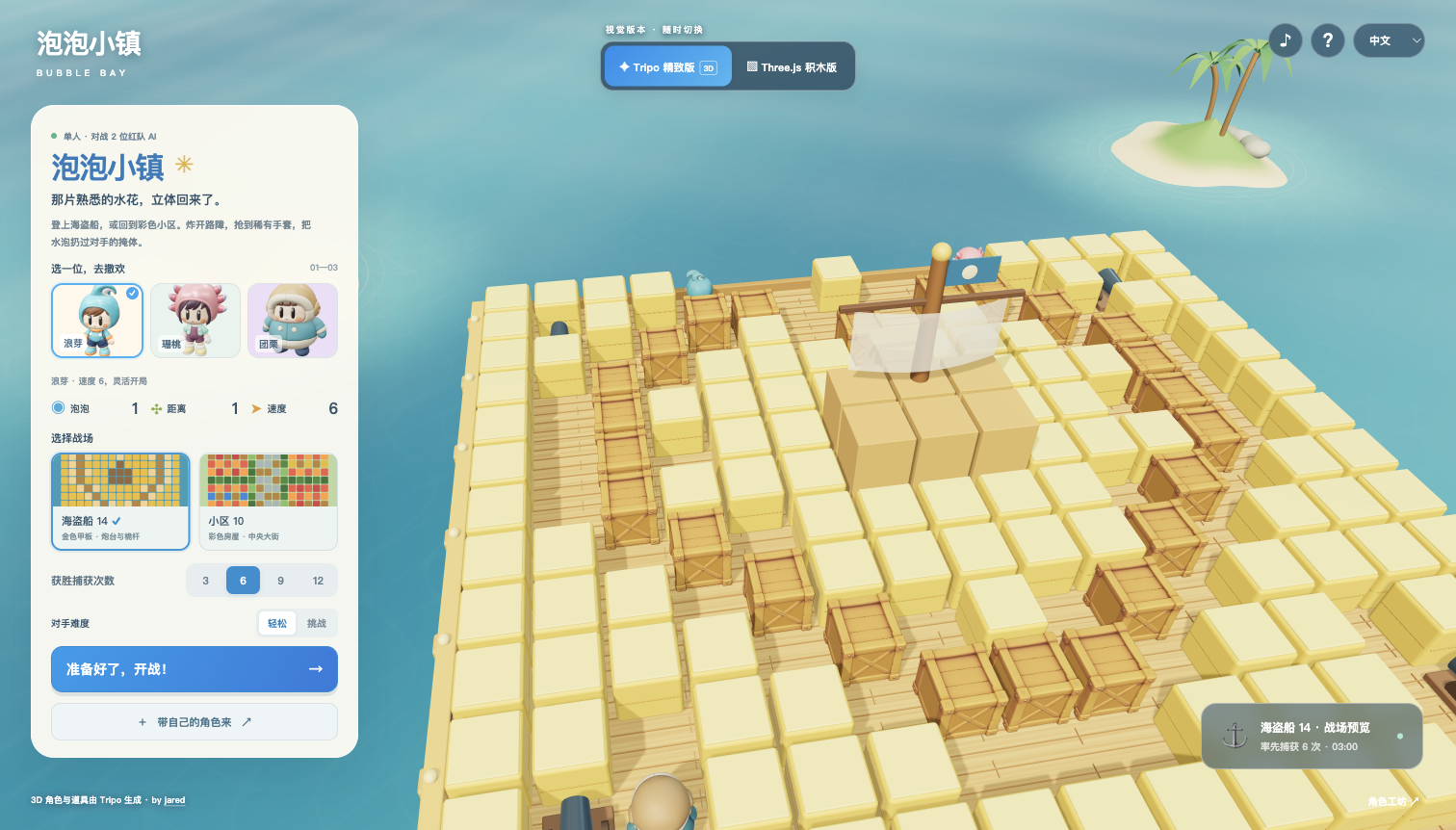
Build a 3D water-balloon battle with original costumed characters Langya, Shantao and Tuanli, animated P2 models, Pirate14 and Village10 arenas, close follow and zoomable overview cameras, AI rivals, six-capture matches, custom character imports and original ElevenLabs music.
A starting brief based on the creator's public project, not a verbatim original prompt. Your result will vary.
Reconstruction specification derived from the maintained Bubble Bay Three.js source and actual gameplay. New costumed human characters Langya, Shantao and Tuanli were built from original front/back concepts with Tripo P2, rig-v1 Mixamo skins, corrected skin weights and locally authored idle/run/jump animations. The new designs replace the prior reference-character meshes. Two original ElevenLabs music tracks and 13 generated sound effects are retained.
Build Bubble Bay, a playable Three.js water-balloon arena with the familiar big-headed, short-bodied, exposed-face costume-character style of classic bubble games. Default to detailed Tripo models with an obvious Three.js geometry comparison switch that preserves the match. Use three new characters: Langya, Shantao and Tuanli. Follow the supplied new character concept/model references, preserving their silhouettes, faces, colors and outfits.
Langya is a lively human boy in a turquoise hood with one connected sideways wave crest, orange collar/cuffs, navy shorts and turquoise shoes with orange soles. Shantao is a small human girl with a dark-plum bob, a peach-pink bonnet with three short petal ornaments on each side, mint jacket, plum short overalls and pale-yellow boots. Tuanli is a chubby human boy with a broad pear-shaped body, a caramel round padded cap with cream face trim, teal short jacket, cream lower belly and navy boots. All show warm skin-colored child faces with simple dark oval eyes and tiny smiles. These are children in newly designed costumes; do not turn them into literal aquatic creatures or reuse the prior recognizable character outfits. Generate each separately through Tripo CLI with explicit tripo-p2 and independent front/back images, then bind valid biped skeletons and skins. Idle/run/jump must drive actual joints; inspect motion, correct headgear/shoe/body weighting and keep provenance accurate. If motions are locally authored, identify them as such.
Localized names: 浪芽 / 랑야 / Langya, 珊桃 / 산타오 / Shantao, 团栗 / 퇀리 / Tuanli. Starting capacity/range/speed levels: 1/1/6, 1/2/5, 2/1/4; caps: 6/7/9, 6/7/8, 9/8/8. Convert speed to 0.25 + level*0.8 world units per second; tiles are 2 units. Choosing a character assigns the other two as distinct rivals with matching profiles. Keep the same gameplay hit radius regardless of the chubby visual silhouette.
Offer 15x13 Pirate/Patrit14 by default and Village10. Preserve recognizable gold deck, yellow cargo, wooden crates, four cannons and central mast; the village has four colored housing districts, a central road, hedges and toy blocks. Use publisher maps as reference, construct runtime artwork yourself, and document small route openings needed for continuous 3D movement and AI escape. Provide bright materials, shadows, ocean scenery, clear camera follow and overview.
One player faces two cooperating AI rivals. WASD/arrows move, F places a 2.5-second bubble, Space jumps onto real platforms, Shift dashes, Q/E orbits, V changes view and Escape pauses. Cross-shaped water respects obstacles, breaks the first soft block and chains bubbles. Implement trapping, escape, enemy captures, respawns, a selectable target of 3, 6, 9 or 12 captures (default 6), or 180-second scoring, result and retry. Touch joystick and action buttons must work simultaneously.
Use six generated Tripo pickups: balloon, range potion, roller skate, throwing glove, kick boot and rescue needle. Crates drop an item 85% of the time. Conditional item weights: 30/30/30/2.5/3.5/4 percent. Gloves add three throws, capped at six. G throws a nearby bubble up to four tiles over cover, preserving its owner and original fuse, reserving its landing and showing an arc. A bubble expiring in flight lands and explodes. K slides bubbles until blocked without resetting the fuse. X uses a rescue needle, starting at one and capped at three. Show inventory and available controls clearly.
Chinese, English and Korean UI: mainland-China IANA timezones select Chinese, Korea/North Korea select Korean, all others including Hong Kong/Macao/Taiwan select English. Manual choice always wins. Upload only embedded-texture, standard uncompressed, genuinely skinned GLB up to 40 MB and 150k triangles. Validate bones, joints and weights, reject static models, use embedded animations where present, and provide basic joint motion for recognized humanoids without clips. Unrecognized skeletons need animations. Explain rigging versus animation plainly, provide a 90-degree orientation adjustment, process locally in-browser, and assign stable balanced stats by file hash.
Use exactly https://studio.tripo3d.ai/?utm_source=satellite_invite&utm_medium=bubble-bay&utm_campaign=create-character for the creation CTA. Credit jared linking to https://x.com/jaredliu_bravo .
Integrate 13 ElevenLabs sound effects with normalization, short decay, distance/pan, polyphony limits, volume and mute: place, burst, crate, pickup, rare, throw, land, trap, rescue, jump, victory, defeat, kick. Create two original instrumental tracks with ElevenLabs music_v2_5, 90 seconds each, matching the nautical pirate map and sunny neighborhood. Normalize them to a restrained -20 LUFS target and crossfade loop boundaries. Give music its own volume control, change tracks by map, fade on pause and honor master mute. Do not reproduce the original game soundtrack.
Keep independent source, dependencies, tests and asset provenance outside the CMS platform apps. Bundle same-origin static resources and MIT notices. Verify actual desktop and touch gameplay, upload variants, languages and visual switching in Ego Lite. Create an immutable review version attached to existing CMS Web Page 12; preserve the existing live release while review is pending. Publish only with truthful source and asset-rights clearance, then verify the public URL, model hashes and behavior. Preserve history and distinguish saved CMS records, previews and public releases.
Load model assets with visible progress, at most three concurrent downloads, a 30-second idle timeout and two attempts. Preserve successful downloads on retry. Hide the entire Tripo / Three.js tab switch until all models are ready, then reveal it. Do not label procedural loading placeholders as loaded Tripo models.
Use a close perspective follow camera that starts outside the spawn facing the arena center. Preserve Q/E orbit, mouse drag pitch and V overview. Keep a compact scoreboard at the top, the mode switch at the upper left, and brief notices near the bottom. Hide joystick and large touch actions on mouse desktops, retaining small rare-item controls; support compact simultaneous touch actions on narrow screens. Add an animated wave shader with teal depth variation, organic sandy islets with curved palms and rocks, subtle wood grain and grass textures. Enclose each trapped character in a size-aware translucent bubble with an iridescent Fresnel rim, gentle float, small bubbles and ground ripples. Verify posed skin vertices fit, reset lift on rescue, and check resource disposal after repeated switching. Avoid expensive scene-wide transmission passes for the water membrane; cap narrow-screen pixel ratio at 1.5.
Provide visible Follow / Overview camera controls and V switching. In Overview, support zoom from 100 to 300 percent using +/− buttons, the mouse wheel and two-finger pinch, with bounded map dragging and Fit map reset. Preserve zoom and the live match when switching camera or rendering versions. Keep compact, non-overlapping rare-item controls in Chinese, English and Korean.
How to use this prompt
01
Start with the right workspace
Open your preferred coding assistant or 3D tool. Use the model shown on the example as a starting point, and check any linked project for setup instructions.
02
Choose one thing to change
Swap the subject, art style or setting. Keep the camera and interaction clear. Build a small version first, then refine one detail at a time.
03
Give the scene its own assets
For a custom character or prop, create a 3D model from a short object description or reference image, then bring it into your project.
Previews belong to their respective creators. Check the original source and project license before reusing code or assets.