3DPrompt.
GitHub
Back to the library
Claude Opus 5.5Reference brief

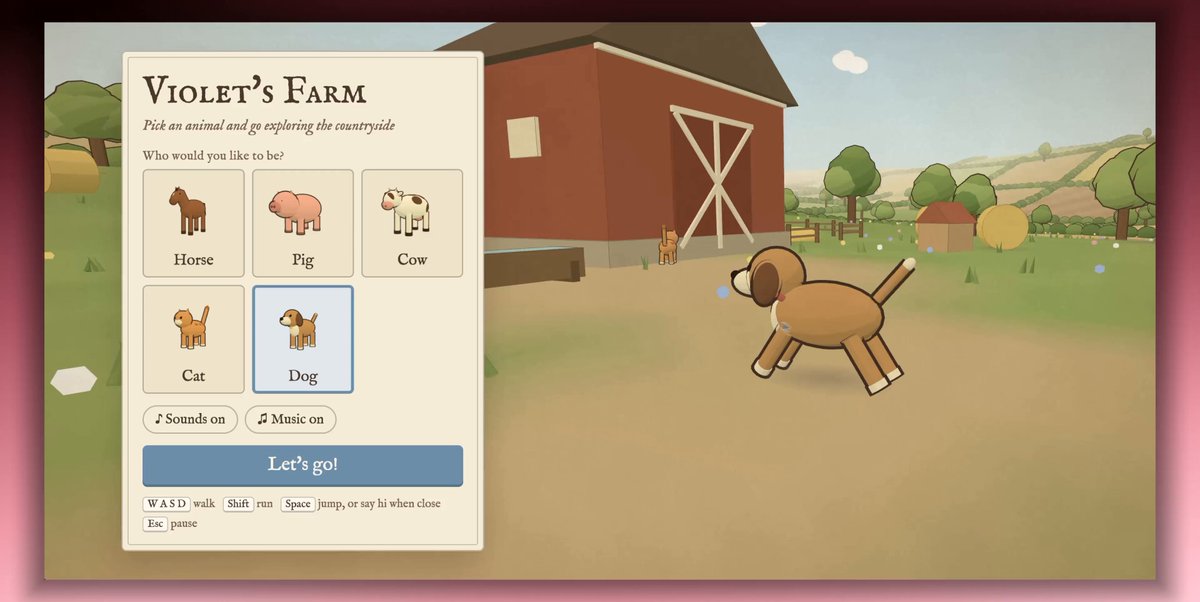
Interactive Peter Rabbit-style farm animal game

A first-hand Claude Opus 5.5 prompt shared by the author for a lightweight third-person farm animal game. It specifies selectable animals, WASD movement, jumping, proximity-based animal interactions, food and water interactions, a pause/reset menu, and a farmland setting.
Created by mblasoView original source
Interactive Peter Rabbit-style farm animal game

About this example

A starting brief based on the creator's public project, not a verbatim original prompt. Your result will vary.

farm animal gamePeter Rabbit stylethird-personThree.jsWebGLanimal pickerproximity interactionsboop animals

The prompt

"Create a interactive farm animal game using the design/art style of "Peter Rabbit" main menu = sounds on/off + animal picker (horse, pig, cow, cat, dog) esc = pause: reset back to spawn/main menu/ wasd to move around spacebar to jump and to interact with other animals when near interactions are randomized upon proximity detection interactions can be make sounds at the other animal (unique from their passive sounds) "boop them" interactible with: water to drink, hay to eat, fruit to eat. 3rd person but as if the camera was slightly behind the animal and above it ambience animals are birds, airplanes in the sky (randomly) setting= farmland, barn, farming village with houses (cant enter houses) Enough assets to capture attention, but not enough that it needs to be deemed production grade, this is just to capture 15 minutes out of my day with my daughter and have fun react, svg, js, webgl, threejs, whatever is necessary to make it feel "good""

How to use this prompt

01

Start with the right workspace

Open your preferred coding assistant or 3D tool. Use the model shown on the example as a starting point, and check any linked project for setup instructions.

02

Choose one thing to change

Swap the subject, art style or setting. Keep the camera and interaction clear. Build a small version first, then refine one detail at a time.

03

Give the scene its own assets

For a custom character or prop, create a 3D model from a short object description or reference image, then bring it into your project.

Previews belong to their respective creators. Check the original source and project license before reusing code or assets.


