A starting brief based on the creator's public project, not a verbatim original prompt. Your result will vary.
Reconstruction specification based on jared’s original Crazy Tanks source, commit bf23b8878a1c24dbfb105a227a06b4faa29d42e9, and verified v92 gameplay. Models were generated with Tripo P2 and music/effects with ElevenLabs. No published social post was supplied.
3D tank gameartillerydestructible terrainThree.jsTripo
The prompt
1. Project goal
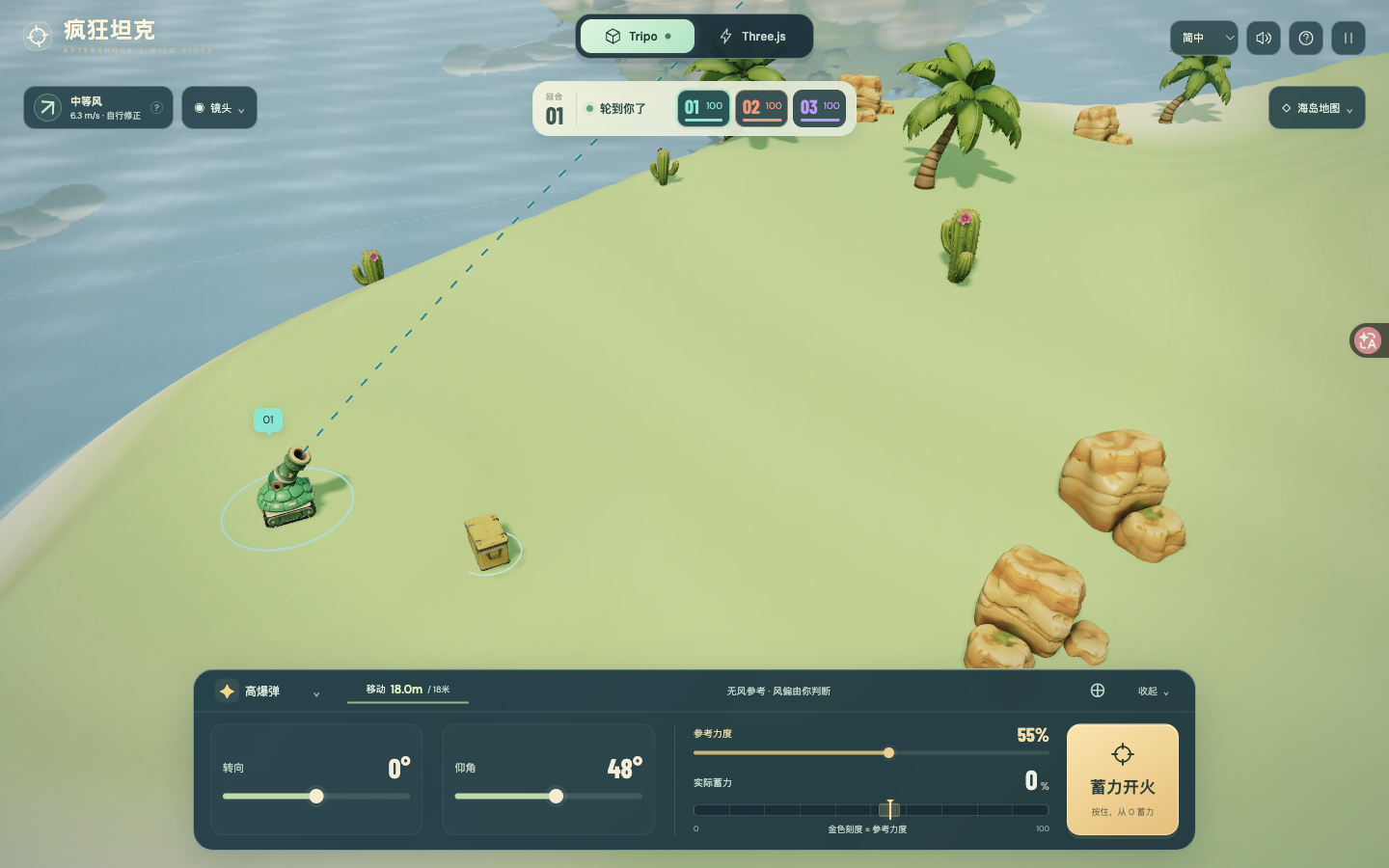
Build Crazy Tanks — Wild Tides, a playable, genuinely three-dimensional turn-based artillery game on a tropical island. The player aims a small tank, reads the wind, times a charge from zero, and reshapes the battlefield with shells. Support solo against AI and local pass-and-play, with a default three-tank free-for-all and an optional two-tank duel. The last surviving tank wins. Use the current reference gameplay and screenshots as the visual target.
2. Visual style
Use a perspective camera and freely orbitable 3D geometry, not flat sprites or a fixed side view. Create a sunny, miniature diorama with rounded jade, coral-orange and blue-violet tanks, creamy sand, pale green grass, turquoise reflective water, soft shadows and a light atmospheric distance haze. Preserve the three tanks' distinct silhouettes and matching barrels. Use a compact cream round/armor panel above the battlefield and a dark teal rounded control deck below it. Gold marks the reference power and firing action; mint marks actual charge and friendly status. Keep the Tripo / Three.js appearance switch prominent at the top, defaulting to Tripo assets. Switching appearances must preserve the match and physics state. Use thin, evenly spaced teal screen-space dashes and a restrained landing circle; do not reflect aiming graphics in the water.
3. World and scene
Use a destructible height-field island approximately 260 by 184 metres, surrounded by ocean at a fixed sea level. Place the starting tanks far apart on stable ground; distribute rocks, palms, cacti and collectible supply crates. Smaller decorative islands provide background depth and never substitute for the destructible main terrain. Blasts deform the surface and can dig below sea level. Keep shoreline color and foam in a single water surface to avoid overlapping planes and flicker. Project tank numbers from world positions every rendered frame. Provide full-trajectory, tank, orbit and tactical overhead views. The trajectory view must fit the firing tank, arc and estimated landing into the space between the HUD and control deck. Before each shot, show the firing tank for about 0.8 seconds, linger at the muzzle, then follow the projectile. Manual camera interaction cancels cinematic following.
4. Asset inventory
Use stable model slots and keep replacement models individually addressable:
- jade-body: rounded green shield-like tracked hull; the player's default body. jade-cannon: matching jade barrel with a dark bore and gold accents, articulated independently.
- ember-body: coral-orange pointed armored hull with a low mechanical profile. ember-cannon: its longer matching orange barrel and dark muzzle.
- bolt-body: blue-violet industrial tracked hull with angular plated armor. bolt-cannon: matching thick blue barrel.
- shell: a brass artillery projectile with a dark tapered tip and cyan accent. Reuse it with weapon-specific tint and scale.
- crate: a yellow armored supply box with cyan marking and reinforced corners; collect it for 20 armor, capped at 100.
- rock: warm rounded sandstone cluster; repeat at varied scale and use a separate collision proxy.
- palm: curved trunk and layered green fronds; repeat as island vegetation.
- cactus: compact green cactus with small flowering details; repeat on dry terrain.
- islet: a rounded grassy background island with pale rock/sand edges; repeat beyond the arena.
Prioritize the three matching body/barrel pairs, followed by shell/crate and environmental props. Keep terrain deformation, ocean, foam, fire, smoke, shockwaves, debris, aim graphics, lighting, UI and collision proxies procedural. Matching body and barrel parts share one design reference and scale. Place the barrel pivot at its mechanical joint, align its forward axis to +X, and use the visible muzzle as the physical launch point. Tank bodies conform to slopes using quaternions; turret aim remains a world-space direction. Preserve source PBR textures and UV seams. Keep full-resolution downloadable models separate from optimized game runtime copies; references and file provenance must identify the actual generation source.
5. Gameplay and feedback
Each living tank receives 18 metres of movement when its turn starts. WASD and the movement pad move relative to the screen; arrow keys and the aiming pad adjust bearing and elevation. Sliders provide bearing, 10–80 degree elevation and 0–100 reference power. Selecting a rival only faces it; it must not solve the shot.
The teal arc estimates the chosen reference power with NO wind. Keep that reference and its gold marker fixed while charging. Hold Fire, Space, or Enter on the focused Fire button to start actual power at 0 every time; increase by 18 percentage points per second, hold at 100, and fire exactly once on release using the actual power at that instant. A quick tap fires a weak shot. The gold band within 3 percentage points is visual feedback only, with no snapping or hidden correction. Cancel on pointer cancellation, window blur or loss of visibility. Lock movement, target and aim changes during a charge. Range-input keyboard controls must not also turn the turret. Zero power represents the lowest launch speed, not a stationary shell.
The arrow and visible drifting wind streaks show where wind pushes the shell. Label wind strength and metres per second; clicking the wind card explains it. Wind blowing left means the player should aim somewhat right. Stronger wind and longer airtime cause greater drift. Wind stays constant during a shot and changes each turn. Never compensate the player preview automatically. Predict terrain landing approximately; do not promise tank/rock collisions, cluster splitting or ricochets in the preview.
Provide six payloads: unlimited HE; a cluster round that splits into five descending submunitions; Seismic with a crater up to 28 metres across and 13 deep; a ricochet round that bounces twice; one Cataclysm round per tank with a crater up to 46 metres across and 22 deep; and Incendiary that leaves a 12-metre-radius fire zone. Fire deals 8 damage at each of six action endings; moving outside avoids damage and overlapping zones do not stack. Seawater extinguishes flames. An entire tank, including its raised barrel, fully below the water is eliminated immediately. Show the real damage, armor loss, terrain collapse, water splash and elimination outcome.
Use layered fireballs, expanding shock rings, emissive sparks, ballistic fragments, dust and smoke with restrained camera shake. Use the provided original ElevenLabs music and cannon, impact, ricochet, heavy blast, fire and splash sounds. Include sound toggle, pause/resume, instructions, replay and return to menu. During projectile flight or AI turns, offer Back to my turn: run the same fixed-step simulation quickly and preserve all damage, terrain and hazard outcomes. Never skip a local friend's input turn.
6. Technical implementation
Use Three.js with ES modules and Vite, local bundled fonts, Web Audio for effects and an HTML audio element for looping music. Keep resources on the same origin and support a static build. Use a perspective renderer with antialiasing, practical shadow and postprocessing budgets, and proper disposal of transient geometry/materials. Distinguish model decoration from gameplay collision.
Keep deterministic physics independent of rendering, with metre/second units, gravity 9.81 m/s² and a 1/120-second fixed step. Use continuous swept collisions for high-speed projectiles against ground, water, tanks and rocks; apply blast impulses and gravity to displaced tanks. Derive launch positions from the actual tank-specific barrel transform. Normal playback and fast-forward must call the same simulation updates. Damage and wind response are stylized game rules, not an engineering blast simulator.
Support Chinese, English, Japanese and Korean UI. Choose from device language initially; Hong Kong, Macau, Taiwan and Traditional Chinese devices default to English. Remember explicit choices and allow a visible language selector. Use responsive desktop, portrait phone and short landscape layouts, scrollable short-screen menus, comfortable touch targets, collapsible panels and no overlapping controls. Do not require keyboard input on touch devices. Keep development-only state mutation and aiming helpers out of production.
7. Completion criteria
Deliver an editable standalone source project, lockfile, npm dev/build instructions and a working static preview. Match the current screenshots and gameplay video, including the cream status panel, gold fixed reference marker, zero-start live charge and fully 3D tank/island presentation. Verify first launch, model loading, a complete turn cycle, each payload's behavior, pause, replay and a real win/loss outcome. Confirm appearance switching preserves state and keyboard/touch cancellation does not fire. At a clear no-wind test shot, releasing at reference power should land close to the reference circle; opposite crosswinds must visibly shift the actual shell while leaving that circle unchanged. Check 30/60/144 Hz behavior, high-speed collision, deep craters, fire expiry, complete submersion elimination and equality of normal/fast-forward turn outcomes. Inspect desktop and narrow layouts in all four languages; identify browser emulation separately from physical-device testing. Validate the hosted page and linked media, not only the local build.
How to use this prompt
01
Start with the right workspace
Open your preferred coding assistant or 3D tool. Use the model shown on the example as a starting point, and check any linked project for setup instructions.
02
Choose one thing to change
Swap the subject, art style or setting. Keep the camera and interaction clear. Build a small version first, then refine one detail at a time.
03
Give the scene its own assets
For a custom character or prop, create a 3D model from a short object description or reference image, then bring it into your project.
Previews belong to their respective creators. Check the original source and project license before reusing code or assets.