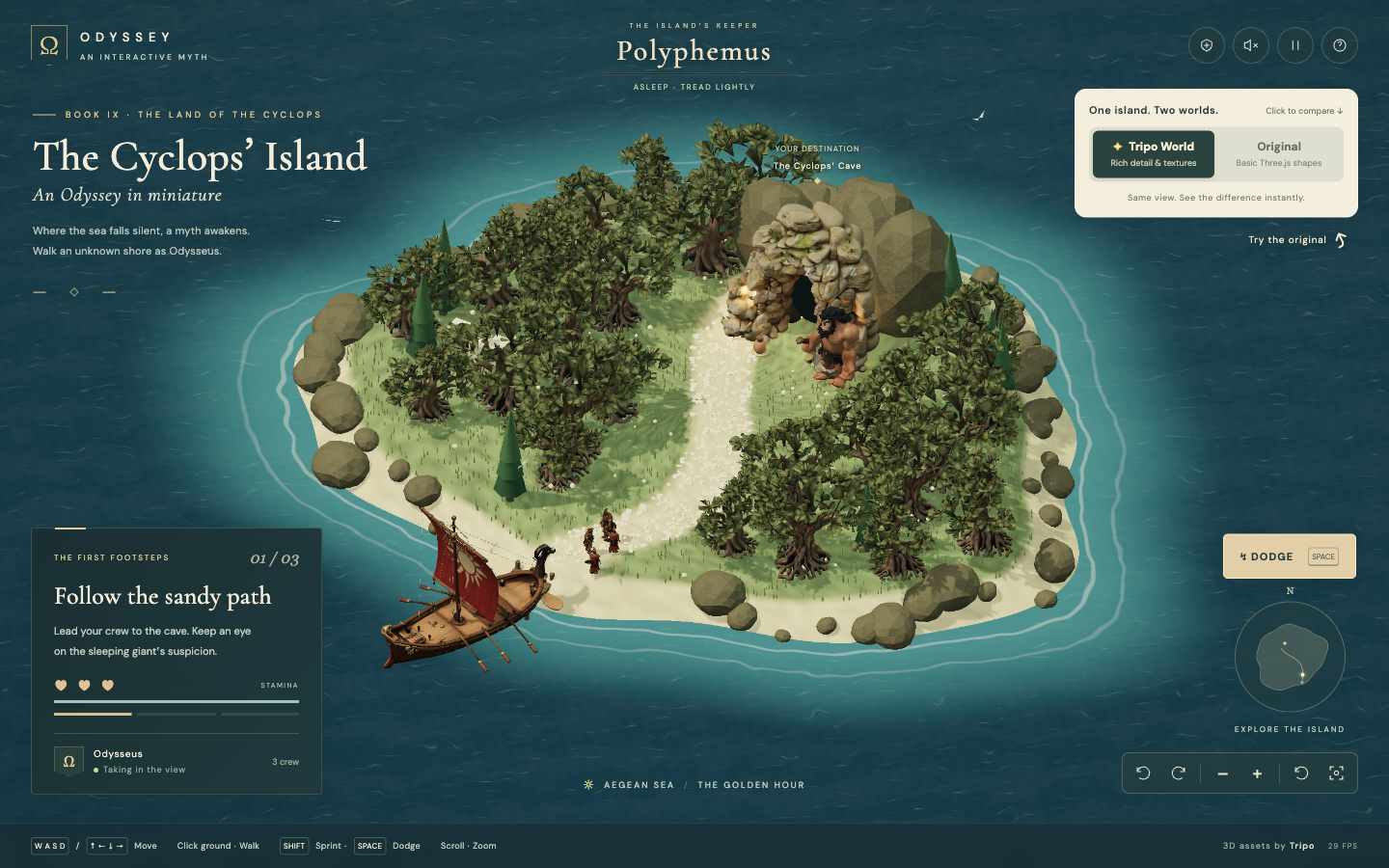
Create a complete Three.js island escape game with simple animated models first. Then upgrade the hero, Cyclops, ship, trees, and cave one at a time through Tripo Studio, using host-agent reference images or text prompts. No Tripo API access is required.
A starting brief based on the creator's public project, not a verbatim original prompt. Your result will vary.
Reconstruction prompt by Jared, inspired by Jason Chew’s Odyssey island concept.
Creator notes
Paste the complete prompt into a coding agent. It first builds and tests the entire playable island with articulated placeholder characters. After that, it introduces Tripo 3D and guides you through one asset at a time: ask the host agent for a reference image if helpful, open the supplied Studio link, upload the image or review the prefilled text, generate, download the textured model, and return to add it to the matching slot. Every Studio link carries the correct mode and campaign parameters. Studio generation and exports follow your account terms; no API key is needed. The live demo shows the completed Tripo version. This revised guided-import brief has not been independently rebuilt in a fresh one-shot session.
Three.js gameTripo Studiono API requiredplaceholder modelsimage to 3Dtext to 3Dguided asset creationCyclops Island
The prompt
# ODYSSEY — The Cyclops’ Island
## 1. Goal
Build a complete isometric escape game inspired by Book IX of the Odyssey. As Odysseus, lead three crew members to steal cave supplies, survive Polyphemus pursuing and striking you, and escape aboard a Greek ship. All game UI is English. Use https://cyclops-island.tripo.page/ and the supplied references; retain Jared’s attribution and the inspiration from Jason Chew’s Odyssey island concept.
## 2. Visual direction
Compose a richly textured Mediterranean tabletop island, about 25 world units across, in a deep teal Aegean sea. Use an orthographic three-quarter camera near (19,31,34), warm limestone, sage olive trees, terracotta cloth, bronze armour and cream parchment. Apply ACES tone mapping, warm directional shadows, atmospheric depth, restrained bloom, vignette and grain. Keep danger markers readable beneath the effects.
Use local Cormorant Garamond-style serif titles and DM Sans-style UI. Top left: an Ω seal, ODYSSEY / AN INTERACTIVE MYTH, BOOK IX and The Cyclops’ Island. A prominent cream comparison card at upper right says “One island. Two worlds.” with Tripo World and Original controls. Bottom left: mission stage, three hearts, stamina and crew count. Show boss state above, a small compass/minimap below, visible camera controls and concise input hints. On phones, compact decorative copy and separate mission, boss, comparison and Dodge controls.
## 3. World
A winding pale-sand path leads north from a southern landing beach through olive groves to a limestone cave. The giant sleeps near the cave; Odysseus and crew begin on the southern path. Put a red-sailed wooden ship southwest by the jetty. Surround the coast with irregular boulders, grass, cypresses and turquoise shallows. Animate sea ripples, shoreline foam, trees, firelight, birds and ship bobbing. Ocean motion must remain correct when the camera rotates.
## 4. Asset inventory
Prepare replacement slots in this order:
- `odysseus`: bearded Greek adventurer, bronze Corinthian helmet with crimson crest, weathered chest armour, ivory tunic, terracotta cape, sandals, small shield and sheathed sword. Reuse for three crew with independent skeletons and animation phases.
- `polyphemus`: burly giant with exactly one central eye, tan olive skin, curly dark hair/beard, fur/leather loincloth, thick bare feet and a wooden club; full body in a neutral riggable pose.
- `ship`: narrow dark-walnut hull, raised prow, bronze ram, mast, terracotta-red sail, rope rigging and side oars; no water or display base.
- `olive`: gnarled gray-brown trunk, spreading roots and irregular sage canopy; reuse about 25 times.
- `cave`: broad freestanding weathered limestone arch with a genuinely open passage, chunky rocks and sparse moss; build the dark interior separately.
- `cypress`: slender tapered Mediterranean tree with dense dark-green foliage.
- `boulder`: irregular warm limestone coastal rock; reuse with varied scale and rotation.
Keep terrain, path, water, grass, supply markers, combat telegraphs, particles and UI procedural. Track each slot and preserve the gameplay map while replacing its appearance.
## 5. Escape encounter
Use camera-relative WASD/arrows and click/tap-to-move with radius-aware A* navigation. Crew follow loosely; player and giant respect terrain, boundaries and obstacles at their different sizes. Shift sprints, Space or the large touch button dodges, E takes nearby supplies, P pauses, Q/R rotate and F follows the hero. Support drag/pan, right-drag/rotate, scroll/zoom and touch pinch. During pursuit, click-to-move sprints while stamina permits.
Stage 1: approach the cave; proximity and noisy sprinting raise suspicion and may wake the giant. Stage 2: collect supplies only at close range, always waking him. Stage 3: survive inside the marked jetty radius of about 2.7 units near (-0.8,8.7) for 11 accumulated seconds while crew board; leaving pauses progress.
Give three health and 100 stamina. Starting speeds: walk 2.35, sprint 4.15 and giant run 3.4 units/second. The giant must chase into 3.6-unit range before attacking. Use sleeping, waking, chasing, windup, impact, recovery and terminal states. Ground Breaker locks the player’s position at the start of a 1.12-second windup, shows a radius-2.45 circle and strikes once; the target must not follow the player. Every third slam releases a clearly marked charged expanding shockwave; damage follows the moving ring edge.
Dodge lasts about 0.34 seconds, costs 24 stamina and has a 1.25-second cooldown, brief invulnerability and valid-ground clamping. Sprint drains stamina; rest restores it. Hits cause knockback, hurt feedback and temporary immunity. Defeat resets all actors, timers, effects and mission state. Escape stops damage and opens a replay summary. Pause freezes simulation, animation and effects. Tune boarding to require several dodges, including a charged attack.
## 6. Implementation and animation
Use Vite, Three.js and JavaScript ES modules for world, navigation, encounter, actors, effects, audio and UI. Bundle all runtime assets locally in a static build. Initial articulated models must walk/run, sleep/wake, dodge and visibly wind up/strike. For skinned replacements use AnimationMixer, actual clip names, short crossfades and SkeletonUtils.clone for separate crew skeletons. Prevent doubled root motion and foot sliding. Synchronize the giant’s downward strike with gameplay impact; static imports must not be reported as animated. Keep a working articulated fallback when necessary. Use Blender only for required rig, pivot, clip or mesh repairs.
Synchronize orange/gold telegraphs, impact flash, ground cracks, dust, sparks, falling rock fragments, expanding rings, brief light and camera shake. Add dodge trails and optional gesture-activated synthesized audio. Pool effects, instance scenery and measure frame time. Normalize imports with grounded feet/roots and unchanged collision proxies. Compare preserves positions, mission, health, stamina, camera and animation state; failed imports retain working models. Include a discreet Change hero control and local model import with per-slot status.
## 7. Acceptance
Deliver source, lockfile, npm development/build commands and static output. Verify obstacle navigation, early wake, close-range collection, pursuit before attack, locked targets, timed strikes, dodge immunity, shockwave-edge damage, defeat/reset and a successful escape. Check independent crew animation, all slot fallbacks, state-preserving comparison, desktop/mobile layout and loading errors. Compare settled screenshots to the reference and report actual performance. Use the shared workflow below for model generation and return.
How to use this prompt
01
Start with the right workspace
Open your preferred coding assistant or 3D tool. Use the model shown on the example as a starting point, and check any linked project for setup instructions.
02
Choose one thing to change
Swap the subject, art style or setting. Keep the camera and interaction clear. Build a small version first, then refine one detail at a time.
03
Give the scene its own assets
For a custom character or prop, create a 3D model from a short object description or reference image, then bring it into your project.
Previews belong to their respective creators. Check the original source and project license before reusing code or assets.