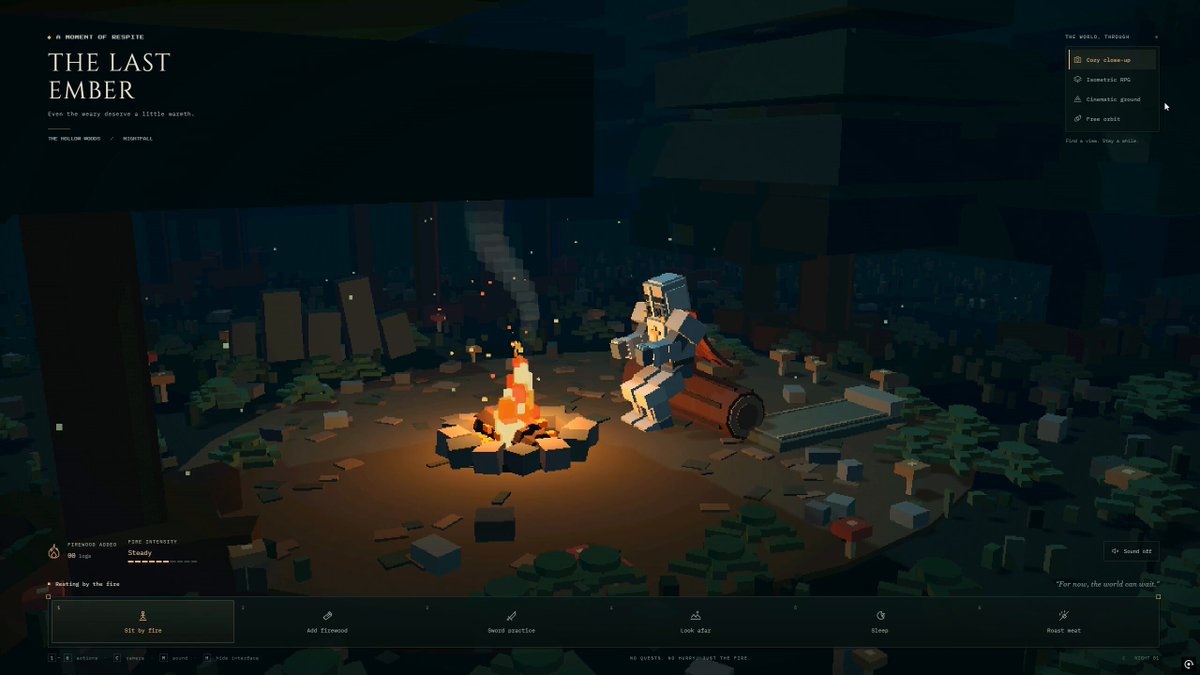
An interactive Three.js voxel-style night-forest camp scene with a procedurally built knight, campfire, selectable knight actions, camera presets, retro HUD, and synthesized ambient audio. The posting author states that they supplied GPT-6 Astra with this prompt and an image.
A starting brief based on the creator's public project, not a verbatim original prompt. Your result will vary.
Three.jsWebGLinteractive 3D scenevoxel artpixel artlow-polyknightcampfire
The prompt
You are a Senior Creative WebGL & Three.js Developer. Your task is to build a complete, production-ready, interactive 3D scene contained entirely within a single standalone HTML file (index.html) using Three.js + webgl
### 1. Visual Theme & Art Direction
- Atmosphere: Deep night forest, cozy glowing campfire, solitary weary knight resting at the campsite (Dark Souls bonfire / classic retro RPG aesthetic).
- Aesthetic: 3D Pixel Art / Voxel / Low-Poly aesthetic.
- Shading & Post-Processing: Integrate Three.js post-processing (RenderPixelatedPass or an equivalent low-resolution pixelation/dithering effect) to achieve an authentic 16-bit/32-bit retro look.
### 2. Scene Geometry & Assets (100% Procedural — No External .gltf/.obj Files)
All assets must be constructed procedurally using Three.js geometric primitives (BoxGeometry, CylinderGeometry, etc.) and basic materials so the file runs locally without CORS issues.
1. Forest Environment:
- Ground: Dark stylized terrain with procedural voxel stones, mushrooms, and low-poly foliage.
- Trees: Procedural pine/spruce or blocky canopy trees surrounding the clearing to create depth and seclusion.
- Sky & Lighting: Deep midnight sky with flickering voxel stars and a cool moonlight DirectionalLight casting soft shadows.
- Depth: THREE.FogExp2 with a dark atmospheric color to blend the horizon.
2. Campfire:
- Stone circle surrounding smoldering logs and procedural ember embers.
- Fire System: Animated pixelated particles (Points or pulsing voxel meshes) rising upward.
- Dynamic Lighting: Warm orange-red PointLight with continuous, natural flicker logic (using Math.sin, noise, or pseudo-random variations).
3. The Knight:
- Hierarchical scene graph (groups for head, torso, upper/lower arms, legs, cape, and sword) built from voxelized primitives.
- Visual details: Slotted helmet, chest armor, pauldrons, gauntlets, and a sheath/sword.
- Pivot points must be aligned correctly at joints (shoulders, elbows, hips, knees) for clean procedural rotation animations.
### 3. Interactive Knight State Machine
Implement smooth procedural animations using linear interpolation (lerp) or trigonometric curves inside the render loop for the following selectable states:
- Sit by Fire (Default Idle): Sits cross-legged or crouched, subtle breathing cycles, warming hands near the flames.
- Add Firewood: Knight stands up, retrieves a log, and tosses it onto the fire. The fire visibly flares up, expands its light radius temporarily, and emits a burst of sparks.
- Sword Practice: Stands up, draws the sword, executes a clean 3-part attack/parry routine, and returns to a combat guard stance.
- Look into the Distance: Walks to the edge of the clearing, plants the sword into the ground, and stares out into the dark while the cape sways.
- Sleep: Lies down on a bedroll beside the fire; floating animated pixel "Z z z" particles rise from the helmet.
- Roast Meat: Holds a stick with food over the flame; emits subtle procedural smoke/steam particles.
### 4. Camera System
Provide preset camera switches with smooth transition interpolation (lerping position and target):
- Cozy Close-up: Medium shot focusing on the knight and the firelight.
- Isometric RPG: Classic high 45-degree tactical overview of the clearing.
- Cinematic Ground: Low-angle dramatic shot looking upward at the knight against the starry sky and pine canopies.
- Free Orbit: Seamless switch to standard OrbitControls for interactive inspection.
### 5. UI & Audio
- UI Style: Retro 8-bit/16-bit RPG HUD layout using semi-transparent dark frames with pixelated borders and an embedded Google Font (e.g., 'Press Start 2P').
- Bottom Panel: Interactive action buttons triggering each knight state.
- Top-Right Panel: Camera angle switcher buttons.
- Firewood Counter: Tracks logs added and current fire intensity.
- Sound (Web Audio API): Procedurally synthesized fire crackle and ambient night breeze/crickets, with a mute/unmute toggle button.
### 6. Technical Specifications
- Single, self-contained index.html file.
- Use ES Modules loaded via CDN (https://t.co/W8o3SZwkCj or unpkg).
- Modular, well-commented code structure (initScene, buildEnvironment, buildKnight, buildCampfire, setupUI, setupAudio, animate).
- Fully responsive window resize handler updating camera aspect ratio and pixelation pass resolution.
How to use this prompt
01
Start with the right workspace
Open your preferred coding assistant or 3D tool. Use the model shown on the example as a starting point, and check any linked project for setup instructions.
02
Choose one thing to change
Swap the subject, art style or setting. Keep the camera and interaction clear. Build a small version first, then refine one detail at a time.
03
Give the scene its own assets
For a custom character or prop, create a 3D model from a short object description or reference image, then bring it into your project.
Previews belong to their respective creators. Check the original source and project license before reusing code or assets.