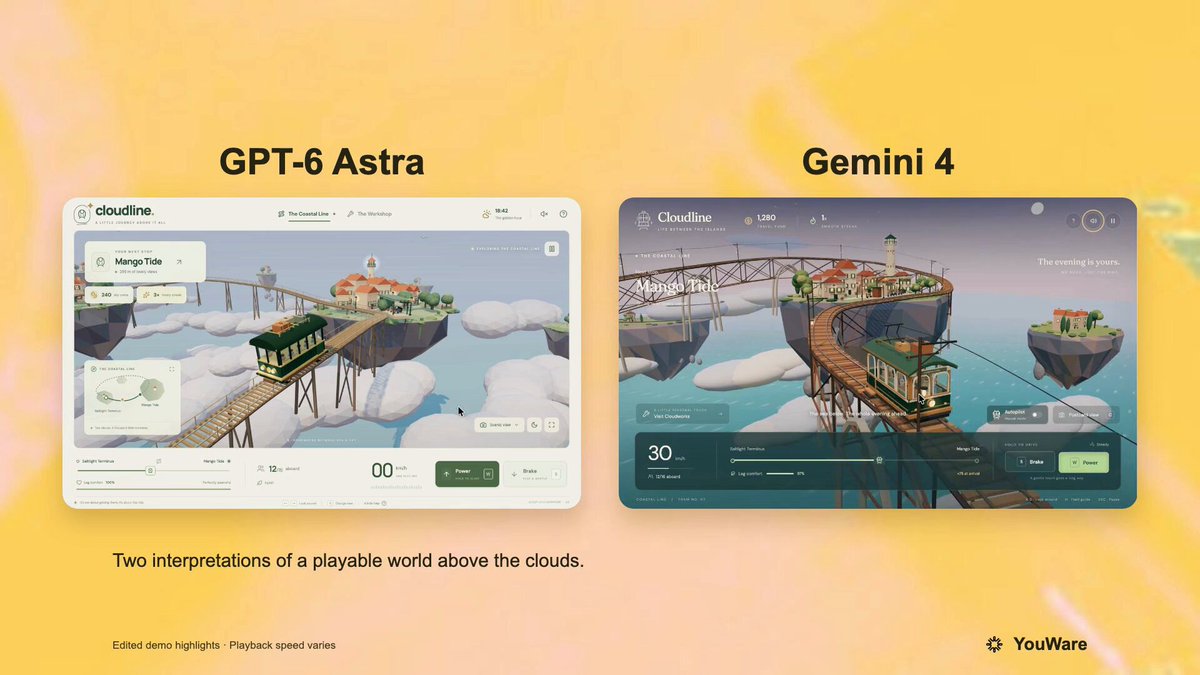
A verified author comment shares the full prompt that the root post says was run against GPT-6 and Gemini 4. It requests a playable browser-based Three.js tram game set on floating Mediterranean-style islands, with driving controls, passenger-comfort scoring, stations, upgrades, and mobile support.
Create a single-file HTML/JS 3D game (Three.js) that can be played directly in the browser, with a warm, low-poly but polished indie game style, evoking the feel of a Ghibli seaside town combined with the smoothness of Zelda's mine cart tracks.
【Core Gameplay】 The player drives a retro aerial tram, traveling between islands floating above a sea of clouds and the ocean surface. - The track is a continuous 3D railway, featuring straight sections, uphill slopes, downhill slopes, elevated curves, and long bridges across the sea - Controls: W to accelerate (Power), S to brake (Brake), left and right for fine-tuning or switching the view - Real-time display: speed in km/h, number of passengers on board (e.g., 12/16 aboard), road conditions (Steady / Crosswind) - Passenger comfort system: sudden acceleration, hard braking, taking corners too fast, and crosswinds all reduce "leg comfort"; arriving at the destination smoothly earns bonus points (e.g., +75 at arrival) - Streak: driving too bumpily will trigger the message "Streak broken. Find your balance to rebuild your tips." - Arrive at the station, open the doors for passengers to get on and off. On the platform, there are townsfolk queuing up, with subtitles such as "Doors opening - Mango Tide," "Please wait…" [World and Stations] At least two routes/two islands: 1. Saltlight Terminus 2. Mango Tide The island is a rocky island floating above the clouds, with small Mediterranean/Southern European-style houses with red-tiled roofs, a lighthouse, a dock, green trees, streetlights, and warm yellow windows at night. In the distance, there are more floating islands and circling orbits. The sky is a blue-purple gradient from dusk to night, with stars and thick clouds, and below is azure seawater. [Tram Exterior] Retro tram: dark green body, wood-colored chassis, curved glass windows, roof luggage, green awning/vine decorations, and various passengers sitting inside. While moving, there is a slight swaying motion and a sense of track sounds (which can be conveyed with simple sound effects or visual cues). [Scene 2: Workshop Modification] Switch to the top-down isometric view of the workshop "Cloudworks / Oliver Cloudworks / Oliver's home island." Players can swap parts for the tram, with an interface like an upgrade pop-up: - Hearth leaves — Lifting the old part - Little Companion — Preparing the tram Progress bar + "Sit back and watch the workshop." Changes to the tram's appearance after modification (e.g., green roof, added luggage rack, lanterns, vines), then it drives out of the workshop, subtitles "All aboard." / "Next stop: the Coastal Line." [UI] Clean modern casual game UI: destination and currency/streak in the top-left, speed bar and Power/Brake buttons at the bottom, comfort progress bar connecting the two station names. No clutter, don't make it horror or cyberpunk. [Technical Requirements] - Single file or minimal files, Three.js - Use curves for the track (CatmullRom, etc.) so the tram follows the rails, camera follows with a slight rail feel - Simple physics feel: acceleration inertia, braking deceleration, body roll when cornering - On mobile, try to also support tap to accelerate/brake - Readable code, with comments, playable as soon as it's opened.
How to use this prompt
01
Start with the right workspace
Open your preferred coding assistant or 3D tool. Use the model shown on the example as a starting point, and check any linked project for setup instructions.
02
Choose one thing to change
Swap the subject, art style or setting. Keep the camera and interaction clear. Build a small version first, then refine one detail at a time.
03
Give the scene its own assets
For a custom character or prop, create a 3D model from a short object description or reference image, then bring it into your project.
Previews belong to their respective creators. Check the original source and project license before reusing code or assets.