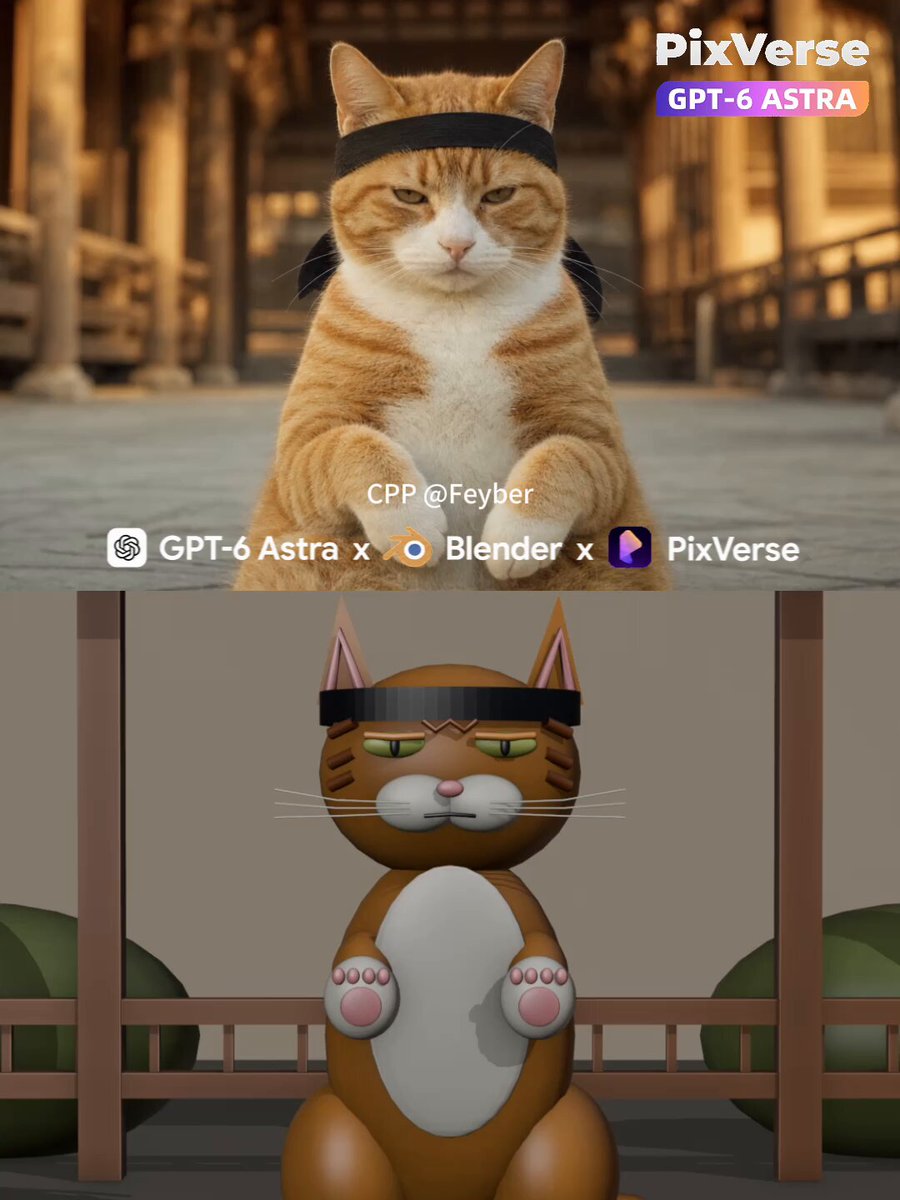
Catfu martial-arts cat 3D animation and video workflow
PixVerse’s verified comment presents this as a prompt used in Hermes Agent. The root post credits PixVerse creator @woleswoosh for the catfu showcase and says it was made with GPT-6 Astra + Blender. The prompt directs an agent to build lightweight Blender meshes and animation for a rigid, stoic tabby cat parrying incoming hands in a Japanese temple courtyard, render a 10-second motion-reference MP4, then generate a photorealistic 1080p video using PixVerse CLI and Seedance 2.5.
Photorealistic cinematic single take, 10 seconds, 16:9, 24fps, locked-off camera, no cuts.
A ginger-and-white tabby cat (white muzzle, chest and paws, orange tabby stripes with an "M" on the forehead) sits upright, dead center, facing the lens in a rigid martial-arts posture — flat, stoic, unimpressed stare, eyes half-lidded, mouth closed, head never moving. It wears a black hachimaki headband tied low across the brow, knot at the back, ears sticking up above the band.
Setting: traditional Japanese temple courtyard — warm wooden pillars, eaves and railings — melted into creamy golden-hour bokeh. 85mm lens, f/1.8, extremely shallow depth of field, focus locked on the cat's eyes. Warm 3500K grade, soft key light from front-right, gently filled shadows, fine film grain.
ACTION: a bare human arm drives in from frame left, open palm thrusting fast at the cat's face with strong motion blur; the cat calmly lifts its right front paw and parries, intercepting the palm and killing the strike's momentum — it blocks, it doesn't slap. The arm sweeps horizontally across the cat's face in a blur, then a second hand chops down from the right; the cat deflects each one with a short minimal paw block, body and head completely still, eyes never leaving the lens. The hands are the aggressors — the cat is purely reactive and unbothered. The hands feint in and out from both sides; the cat slides into a two-paw boxing guard at chest height, paws curled, elbows in, and holds it, waiting. It snaps out quick blurred single-paw counters, kung-fu style, catching the incoming hands mid-air, head still locked forward. Finally it drives its right paw straight into the lens, pink pad facing camera, until the paw fills the frame as a soft out-of-focus foreground shape — the face stays razor sharp behind it, cold stare intact.
Motion: natural speed, real motion blur on the flying hands and the fast paw blocks. Defensive, minimal, economical cat movement — it barely moves, the hands do all the work and fail. No camera movement, no zoom, no text.
NEGATIVE: extra limbs, fused/mutated paws, extra fingers, distorted face, headband merging into fur, plastic skin, oversaturated color, text, subtitles, logo, watermark, cuts, camera shake, playful/celebratory body language, high-five gesture.
SHORT VERSION:
Ginger-and-white tabby cat in a black hachimaki headband sits in a sunlit Japanese temple courtyard, deadpan stare at camera, 85mm f/1.8 shallow DOF, golden hour, film grain. Human hands chop and thrust in fast at its face from both sides in motion blur — the cat calmly parries each strike with a minimal paw block, never moving its head. It drops into a two-paw kung-fu guard, throws fast blurred counters, then drives its paw into the lens until the pad fills the frame. Locked-off single take, 10s, 16:9, 24fps, photorealistic, no text.
Catatan kecil dari frame: tangannya dominan masuk dari kiri (chop descending + sweep horizontal), kontak terjadi di wrist/palm — bukan paw-to-paw. Guard dua paw ada di ~4.0-5.6s, counter blur di 5.6-8s, finish paw ke lensa 8-10s. your job is to make 3d mashed with blender mcp and make 10s 24fps output amd render it to super realistic scene with pixverse cli using seedance 2.5 as video model generation
AGENT STEPS: Check Blender MCP, PixVerse CLI authentication, model capabilities, and available credits. Disclose estimated costs and obtain spending approval before paid generation. Turn the prompt into a timed beat sheet, build lightweight 3D meshes and animation through official Blender MCP, render a motion-reference MP4, and inspect framing, motion, contacts, duration, and frame rate. Generate and inspect a separate appearance-reference image before submitting the video. Use the image to guide identity, style, and lighting, and the Blender video to guide movement and timing. After generation, download the result, verify technical specs, inspect key frames, report deviations honestly, and calculate actual credit usage. Preserve originals; never silently switch models or regenerate.
PIXVERSE CALL: Use pixverse create image with gpt-image-2.0 to create the appearance reference at the confirmed aspect ratio, 1080p, high detail. Then use pixverse create reference with the confirmed video model, passing both --images and --videos to combine the appearance image with the Blender motion reference. For Seedance 2.5, use --model seedance-2.5 --task-type auto, the confirmed duration/aspect ratio, and --quality 1080p --count 1. Verify current capabilities before submission, use unique idempotency keys, and track completion through pixverse task status / pixverse task wait.
FINAL OUTPUT: Return the completed video at the confirmed aspect ratio and duration, targeting 1080p and 24fps, plus the appearance-reference image, Blender .blend project, and motion-reference MP4. Provide absolute local paths or downloadable URLs. Keep the final report format: Video, Gambar referensi, Blender mesh + animasi, Check, Look, and Kredit terpakai. Report actual resolution, frame rate, frame count, duration, visual deviations, image/video credit costs, total spent, remaining balance, and whether any regeneration occurred.
How to use this prompt
01
Start with the right workspace
Open your preferred coding assistant or 3D tool. Use the model shown on the example as a starting point, and check any linked project for setup instructions.
02
Choose one thing to change
Swap the subject, art style or setting. Keep the camera and interaction clear. Build a small version first, then refine one detail at a time.
03
Give the scene its own assets
For a custom character or prop, create a 3D model from a short object description or reference image, then bring it into your project.
Previews belong to their respective creators. Check the original source and project license before reusing code or assets.