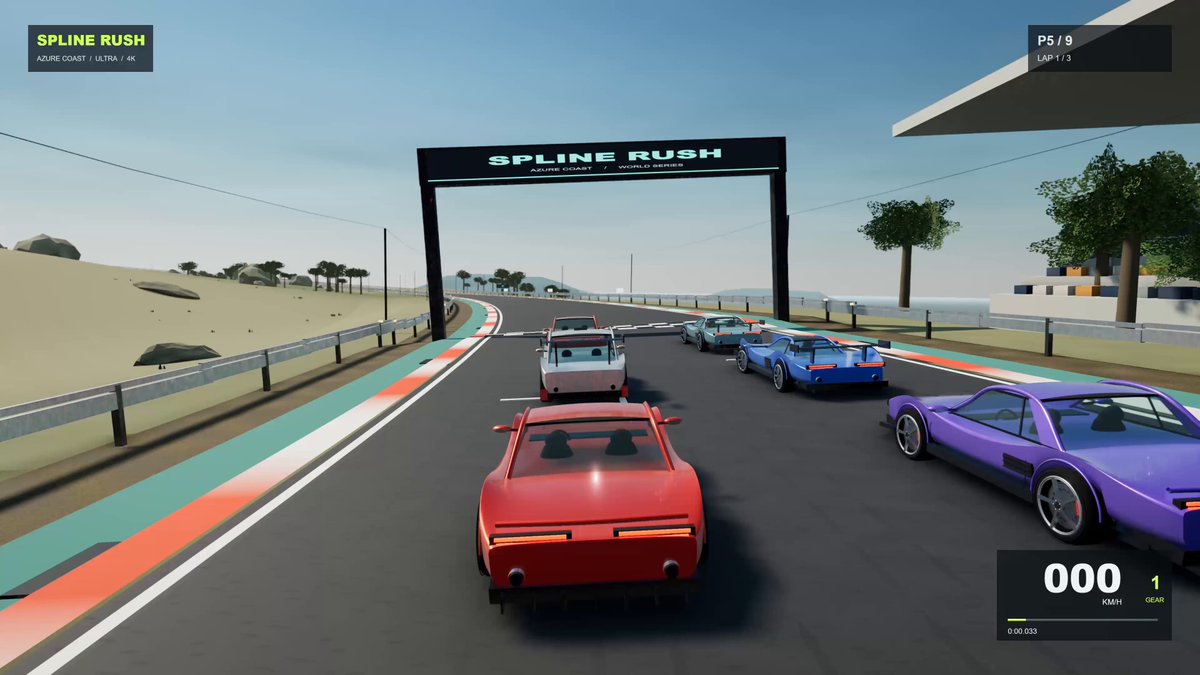
A verbatim prompt supplied in the root author’s verified comment for creating Spline Rush, a procedural Three.js browser racing game with tracks, AI opponents, physics, graphics presets, and synthesized audio.
A starting brief based on the creator's public project, not a verbatim original prompt. Your result will vary.
Three.jsWebGPUbrowser racing gameprocedural generationracing tracksAI opponentsvehicle physicsWeb Audio
The prompt
Build a complete, production-quality browser racing game called Spline Rush using the latest Three.js (WebGPURenderer + TSL where possible). 100% procedural: no external models, textures, audio files or fonts. Everything generated in code at runtime.
CORE GAME
- 6 unique tracks with elevation, banking, tunnels, hairpins, named corners and distinct biomes (coastal day, mountain dusk, desert sunset, forest rain, night city neon, high-speed oval).
- Championship mode (qualifying + 3 races), Time Trial with ghosts, Quick Race.
- 8 AI opponents with personality, racing line, braking points, overtaking and defending.
- Best lap records, sector times, live event feed, replay camera.
- Garage: 5 parametric cars with clearcoat + metal-flake paint, panel gaps, working lights, animated suspension, damage states.
GRAPHICS TARGET (Ultra, worthy of RTX 5090 at 4K)
Renderer: THREE.WebGPURenderer. Physically based pipeline.
Lighting:
- Rayleigh/Mie physically based sky + starfield + moon + dynamic sun that drives a full day/night cycle.
- Cascaded shadow maps (4 cascades, stable texel snapping, high-res).
- IBL via PMREM updated with time of day.
- Volumetric fog + god rays + heat haze.
Materials:
- MeshPhysicalMaterial / TSL nodes: clearcoat, anisotropy, transmission on glass, metal-flake paint, wet-road shader that reacts to rain.
Post-processing chain (RenderPipeline / TSL or postprocessing library):
GTAO or high-quality SSAO → SSR → bloom (Karis) → motion blur (velocity) → DOF → god rays → auto-exposure → color grading + film grain + vignette → SMAA or TAA.
Effects:
- GPU particle pools: tyre smoke, sparks, dust, rain spray, grass/gravel kick-up, heat distortion.
- Skid marks that persist and fade.
- Dynamic wetness and puddle reflections when raining.
PHYSICS & FEEL
- Fixed-step 120 Hz simulation.
- Raycast or strut suspension, load transfer, combined-slip tyres, ABS/TC, surface types (asphalt, kerb, grass, gravel, wet).
- Camera: cinematic chase + hood + onboard with motion and collision shake.
AUDIO
- Fully synthesised Web Audio: multi-layer engine by RPM/load, wind, tyre screech, kerb rumble, crowd, dynamic music.
QUALITY SYSTEM
- Presets: Low / Medium / High / Ultra.
- Ultra assumes RTX 5090-class GPU: 4K, high shadow maps, max particles, all post effects on, no aggressive LOD.
- Adaptive quality that can drop effects if frame time exceeds target.
Start with a playable first version (one track, one car, basic lighting), then iterate feature-by-feature exactly as requested. Keep everything in a single clean HTML/JS (or Vite) project that runs locally. Comment major systems. Make it look expensive, not cute.
How to use this prompt
01
Start with the right workspace
Open your preferred coding assistant or 3D tool. Use the model shown on the example as a starting point, and check any linked project for setup instructions.
02
Choose one thing to change
Swap the subject, art style or setting. Keep the camera and interaction clear. Build a small version first, then refine one detail at a time.
03
Give the scene its own assets
For a custom character or prop, create a 3D model from a short object description or reference image, then bring it into your project.
Previews belong to their respective creators. Check the original source and project license before reusing code or assets.