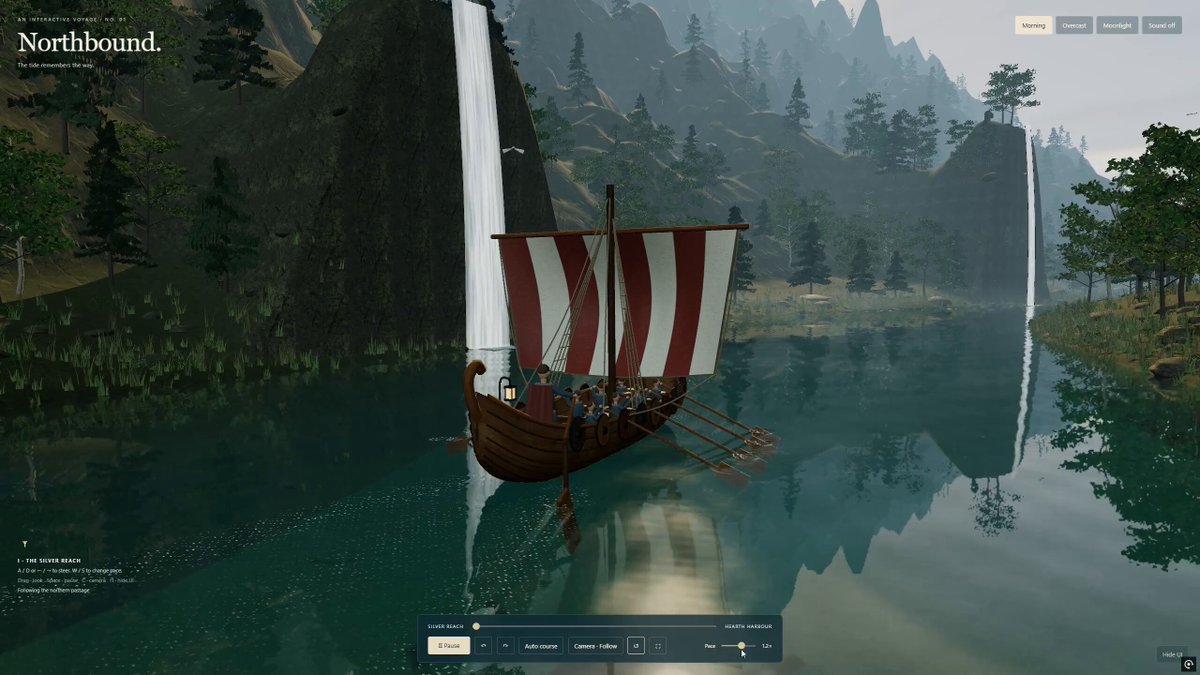
An author-supplied prompt for a standalone Three.js and WebGL interactive 3D fjord voyage aboard a detailed Viking longship. It specifies a cinematic Nordic environment, physically connected ship construction, animated rowing and water-contact effects, steering and camera controls, mobile support, lighting modes, audio behavior, and embedded delivery assets.
Create “Northbound” - a beautiful, interactive 3D journey through a Nordic fjord aboard a detailed Viking longship.
Build a genuine real-time scene using Three.js and WebGL, delivered as a single standalone HTML file. This must be an explorable browser experience, not a pre-rendered video or a flat illustration.
VISUAL DIRECTION
Aim for a polished, cinematic environment with realistic materials, natural proportions, and restrained colors. Avoid a cartoon or low-poly appearance.
A wooden longship travels through deep green-blue water between towering cliffs, dense forests, waterfalls, and small Nordic settlements. Use atmospheric perspective, subtle mist, soft shadows, and convincing depth. Compose beautiful views throughout the journey, not just from the initial camera position.
THE LONGSHIP
Construct a detailed, watertight hull with overlapping wooden planks, visible grain, ribs, benches, and a continuous interior.
Add a carved dragon prow, striped cloth sail, mast, ropes, shields, supplies, and warm lanterns.
Include proportionate Viking passengers and rowers with layered clothing, believable seated poses, and hands positioned near their oars.
Keep every component physically connected. No floating passengers, intersecting accessories, or visible gaps through the hull.
Animate subtle buoyancy, pitch, and roll. The sail should respond gently to the wind.
WATER AND ROWING
Make the water a central visual feature.
Use a custom shader with planar reflections, refraction, Fresnel highlights, depth-dependent absorption, visible shallow areas, and layered surface ripples. Reflections must respond correctly to the moving camera and changing lighting.
Create a believable wake behind the ship.
Animate a complete rowing cycle: blades enter the water, pull backward, lift out, and return above the surface. Coordinate this with the rowers’ movement.
Generate ripples, foam, and small droplets at the actual blade-water contact points. Trails must remain in world space and gradually dissipate. Avoid effects appearing while the blades are in the air.
ENVIRONMENT AND MATERIALS
Use detailed terrain, irregular rock formations, natural tree silhouettes, branching trunks, and individual leaf or needle clusters.
Use PBR materials with normal and roughness maps for wood, stone, and ground. You may embed appropriately licensed textures; include attribution where required.
Ensure the underwater terrain continues beneath the surface. No bright seams, shoreline gaps, floating vegetation, or trees obstructing the navigable route.
CONTROLS
A/D or arrow keys: steer left and right.
W/S: adjust speed.
Mouse drag: look around.
Provide follow, orbit, and cinematic camera modes.
Include an optional automatic journey mode.
Add pause, reset, fullscreen, and hide-interface controls.
Support touch steering and speed controls on mobile.
Prevent the ship from passing through land and rocks.
ATMOSPHERE AND INTERFACE
Provide three smoothly transitioning lighting presets: Morning, Overcast, and Moonlight.
Add optional ambient water, wind, birds, and rowing sounds. Audio must begin only after user interaction.
Design a minimal editorial interface: “Northbound.” in an elegant serif typeface, subtle chapter labels, and a compact translucent control bar. Keep the scenery unobstructed.
PERFORMANCE AND DELIVERY
Use instancing, sensible geometry budgets, distance-based detail, and appropriately sized reflection targets. Adapt rendering quality to the device instead of promising a fixed frame rate.
Deliver one HTML file with scripts and required assets embedded so it can open directly in a modern browser.
Test steering, camera modes, lighting transitions, and rowing. Inspect the ship from multiple angles and check the shoreline from low viewpoints. Fix geometry intersections, reflection artifacts, excessive glare, and console errors before considering the scene finished.
Prioritize convincing water, a beautifully constructed longship, and a cohesive environment over adding more objects.
How to use this prompt
01
Start with the right workspace
Open your preferred coding assistant or 3D tool. Use the model shown on the example as a starting point, and check any linked project for setup instructions.
02
Choose one thing to change
Swap the subject, art style or setting. Keep the camera and interaction clear. Build a small version first, then refine one detail at a time.
03
Give the scene its own assets
For a custom character or prop, create a 3D model from a short object description or reference image, then bring it into your project.
Previews belong to their respective creators. Check the original source and project license before reusing code or assets.