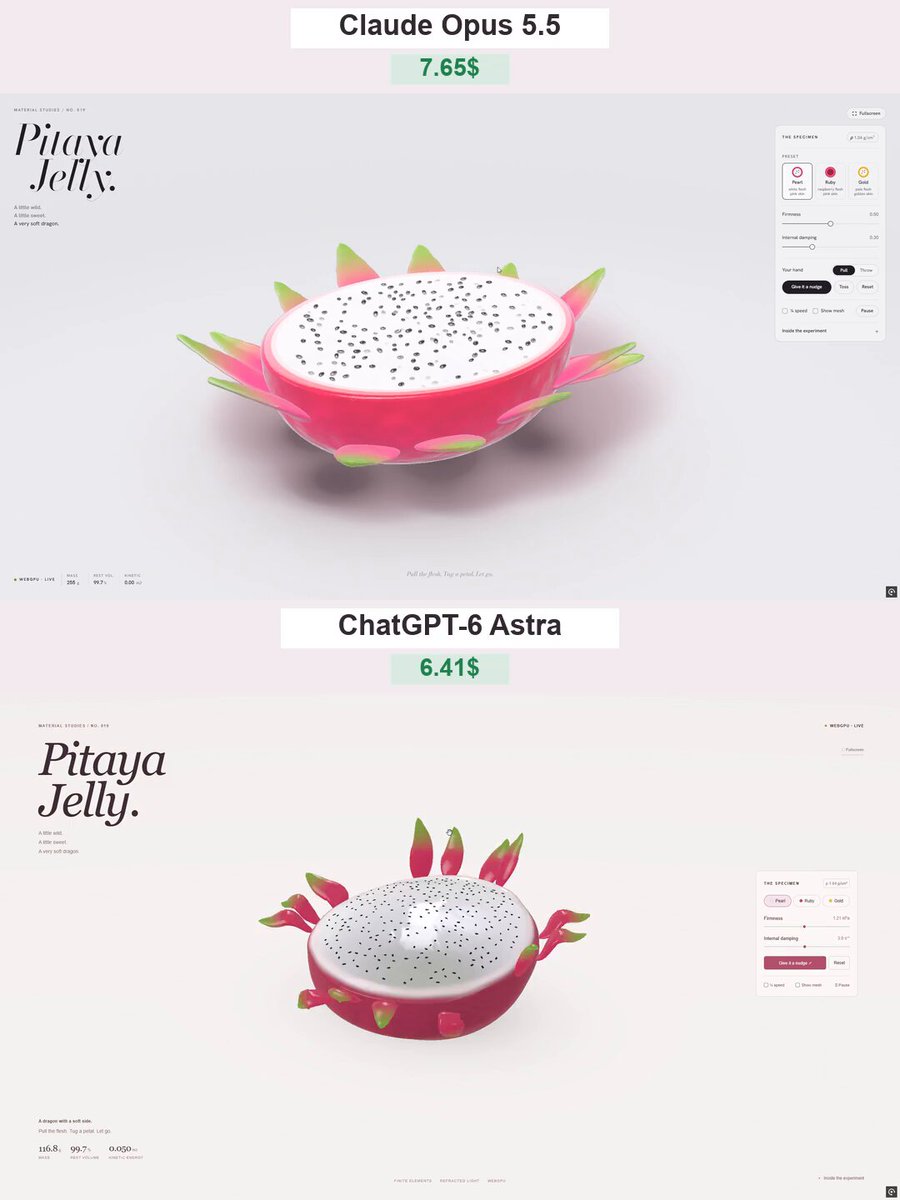
An author-shared prompt for GPT-6 Astra to create a browser-based interactive 3D dragon-fruit jelly material experiment. It specifies procedural WebGPU geometry, translucent gummy materials, soft-body deformation, draggable peel petals, touch support, presets, simulation readouts, and a light studio-style interface.
Create an interactive 3D scene called “Pitaya Jelly” — a dragon fruit half made of soft, translucent jelly. Build the entire project in a single HTML file using genuine WebGPU rendering and WGSL shaders. Do not use premade models or image assets.
APPEARANCE
A large dragon fruit half resting cut-side up on a light studio surface.
Rich raspberry-pink skin, a thin pale inner rind, and pearly white flesh.
Approximately 250 tiny black seeds distributed naturally across the flesh.
12–14 fleshy peel petals around the fruit, transitioning from pink bases to green tips.
A glossy, wet surface with light refraction, small internal bubbles, and a soft contact shadow.
The material should look like soft gummy candy, not rigid plastic. Preserve saturated colors without blown-out highlights.
PHYSICS AND INTERACTION
Implement genuine soft-body deformation using a volumetric mesh with elastic connections and volume-preserving constraints, such as XPBD.
Users can grab the flesh with a mouse or finger, stretch it, and release it.
Deformation should concentrate around the grabbed point rather than simply translating the entire object.
After release, the fruit should wobble, jiggle, and gradually recover its original shape.
Make the peel petals individually draggable. They should be softer than the flesh, bending and springing back while remaining attached to the fruit.
Seeds must follow the deforming surface without floating away or sinking into the flesh.
Keep the simulation stable during strong pulls, with floor contact and protection against inverted elements.
VISUAL DESIGN
Use a minimal, light-themed studio interface with an editorial aesthetic: generous whitespace, thin borders, restrained controls, and no unnecessary decoration.
Top left:
“MATERIAL STUDIES / NO. 019”
A large italic serif heading on two lines:
“Pitaya Jelly.”
Below it:
“A little wild.”
“A little sweet.”
“A very soft dragon.”
On the right, add a floating panel titled “THE SPECIMEN” containing:
Density badge: ρ 1.04 g/cm³.
Three presets:
Pearl — white flesh and pink skin.
Ruby — raspberry-colored flesh and pink skin.
Gold — pale flesh and golden skin.
Firmness and Internal damping sliders with visible values.
“Give it a nudge” and “Reset” buttons.
“¼ speed” and “Show mesh” checkboxes.
A “Pause” button.
Also include:
A fullscreen button with an exit option.
A “WEBGPU · LIVE” status indicator.
Live readouts for mass, percentage of rest volume, and kinetic energy.
A short interaction hint: “Pull the flesh. Tug a petal. Let go.”
A collapsible “Inside the experiment” section explaining the implementation accurately.
TECHNICAL REQUIREMENTS
Deliver one self-contained file named pitaya-jelly-webgpu.html.
Use actual WebGPU rendering, not a Canvas 2D imitation.
Build all geometry procedurally.
Use thickness-aware refraction, Fresnel reflections, and soft studio lighting.
Use a fixed simulation timestep for consistent behavior.
Support desktop and touch interaction with a responsive layout.
Avoid expensive geometry reconstruction or shader compilation during dragging.
Show a clear fallback message when WebGPU is unavailable.
Verify dragging, release, shape recovery, presets, reset, pause, fullscreen, and mobile layout.
The main priorities are convincing jelly-like behavior, beautiful materials, and satisfying interaction. The result should feel like a polished, playable material experiment.
How to use this prompt
01
Start with the right workspace
Open your preferred coding assistant or 3D tool. Use the model shown on the example as a starting point, and check any linked project for setup instructions.
02
Choose one thing to change
Swap the subject, art style or setting. Keep the camera and interaction clear. Build a small version first, then refine one detail at a time.
03
Give the scene its own assets
For a custom character or prop, create a 3D model from a short object description or reference image, then bring it into your project.
Previews belong to their respective creators. Check the original source and project license before reusing code or assets.