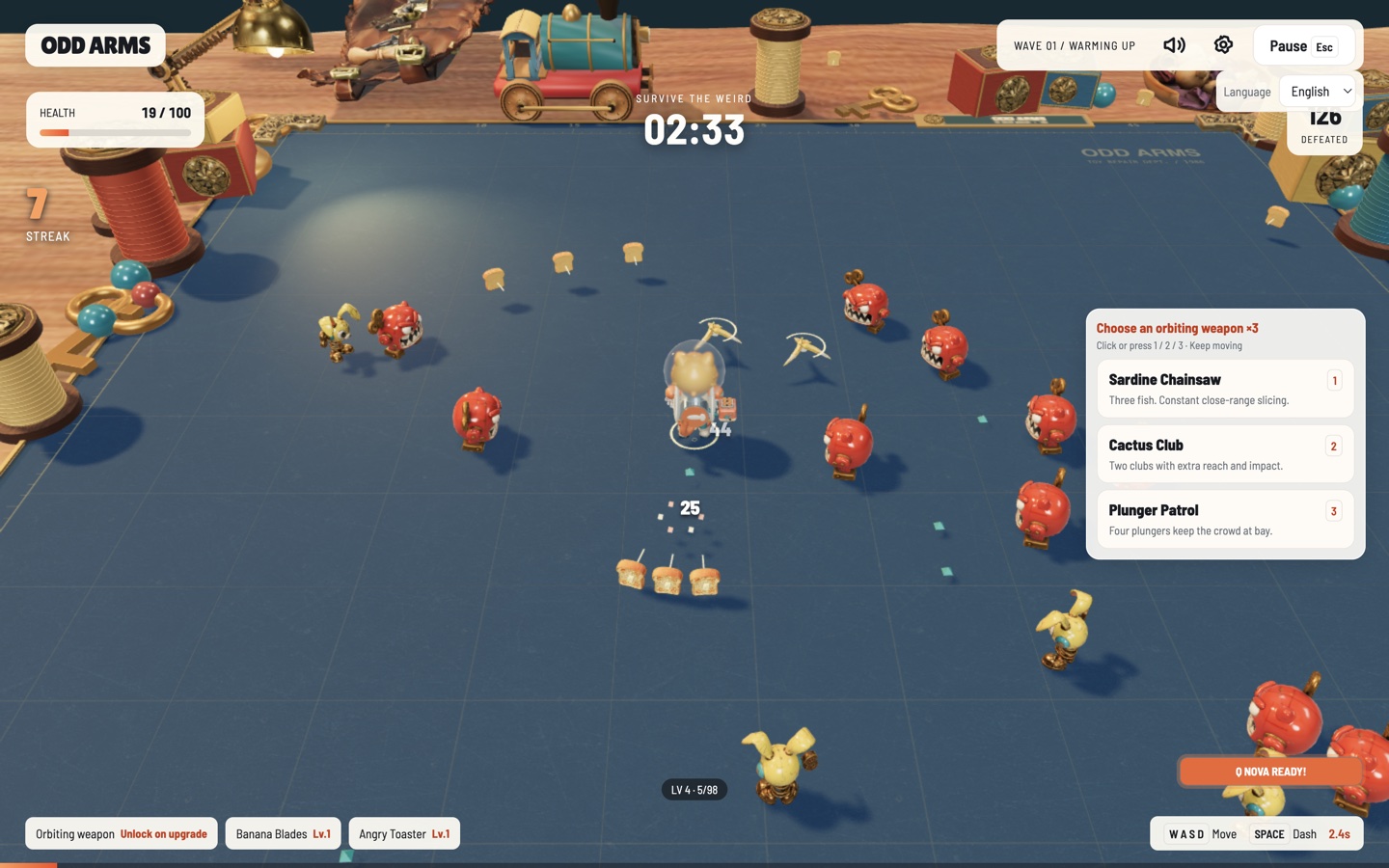
Build a three-minute Three.js survival game where a toy hero with banana blades, toasters and plungers fights wind-up monsters on a workbench. Players can create their own hero or weapon in Tripo Studio and import the GLB to play.
A starting brief based on the creator's public project, not a verbatim original prompt. Your result will vary.
Written by the author from the ODD ARMS source (v0.2.0, commit 76df11f) and a live play-through of odd-arms.tripo.page on 2026-09-18; all numbers come from the game code.
# ODD ARMS — Your idea. Your hero.
## 1. Goal
Keep all game UI in English (add Japanese as an optional language switch).
Build a complete three-minute browser survival game in the "auto-attack horde" genre: the player picks a toy-sized hero and two wonderfully weird weapons, then survives 180 seconds of monster swarms on a craftsman's workbench. Weapons attack automatically; the player only moves, dashes, collects crystals, picks upgrades and fires a charged nova. The hook is personal: players can create their own hero or weapon in Tripo, download the GLB and drop it into the game. Use https://odd-arms.tripo.page/ and the supplied references for the finished result. Credit Deniffer at https://x.com/lumina__team.
## 2. Visual direction
Frame the game as a miniature toy diorama seen from a fixed three-quarter top-down camera that follows the hero. The playfield is a deep navy cutting mat with a faint grid and printed "ODD ARMS" corner marks, laid on a warm wooden desk. The desk rim is crowded with oversized craft props (thread spools, ornate brass-rosette boxes, a leather tool roll, a brass desk lamp, a wooden toy train, toy parts) so the arena reads as a real tabletop. Use warm key light from the lamp side, soft ambient fill, contact shadows and gentle bloom; characters are glossy, chunky, collectible-figure style with saturated colours.
UI: cream-white rounded cards with navy text and a coral-orange accent, a heavy condensed display font for headlines ("LET'S MAKE SOME TROUBLE.") and a clean condensed sans for body. In battle: health card top-left, streak counter under it, "SURVIVE THE WEIRD" countdown top-centre, wave label + sound + settings + Pause top-right, defeated count right, level/XP pill bottom-centre, three weapon chips (orbit / returning / shooter with levels) bottom-left, controls + dash cooldown bottom-right, "Q NOVA READY!" pill above it. Juice: damage numbers, crits, squash-and-stretch enemies, knockback, pop particles, light camera shake (disable shake when prefers-reduced-motion is set).
## 3. World
One square arena, clamp the hero to ±23 units on both axes. The cutting mat fills the play area; the desk and props sit outside the clamp as scenery only (no collision). The arena starts empty and fills from the edges: enemies spawn on a ring 12–16 units from the hero (8–11 in the first second) and walk straight at the hero. Every 22 seconds a surge spawns a full circle of enemies at radius 13. Red warning circles appear under the hero's current position (first at 28 s, then every max(4.4, 9 − t/50) s) and explode after 2 s.
## 4. Asset inventory
Prepare stable model slots; every slot must load a single GLB, be centred, auto-scaled to a target height, and fall back to a simple placeholder if loading fails.
Heroes (10, `hero:<id>`), each a chunky toy figure with a distinct silhouette:
- `cat` Astro Cat — orange tabby in a white space suit and glass helmet. HP 100, speed 6.8, magnet ×1.35, dash cooldown 2.4 s.
- `frog` Frog Fighter — green frog in red boxing gloves. HP 130, speed 6.8, dash damage 135.
- `shroom` Mushroom Hero — red-cap mushroom with a small cape. HP 90, speed 7.6, dash 1.8 s.
- `capybara` Chill Capybara — relaxed hot-spring capybara. HP 160, speed 5.8, magnet ×1.15, dash 3 s, dash damage 110.
- `ramen` Ramen Ronin — samurai carrying a steaming ramen bowl. HP 105, speed 7.2, dash 2.2 s, dash damage 120.
- `penguin` Office Penguin — penguin in a shirt and tie. HP 80, speed 7.1, dash 1.5 s, dash damage 75.
- `axolotl` Axolotl — pink axolotl explorer. HP 85, speed 7.3, magnet ×1.6, dash damage 75.
- `avocado` Avo Boxer — avocado boxer with a seed core. HP 120, speed 6.4, dash 2.1 s, dash damage 130.
- `robot` Clockwork Bot — wind-up tin robot with a key. HP 115, speed 6.2, dash 2.8 s, dash damage 165.
- `snail` Snail Knight — knightly snail carrying its house-sized shell. HP 190, speed 5.2, magnet ×1.2, dash 3.2 s, dash damage 120.
Default dash damage is 90 when not listed.
Weapons (12, `weapon:<id>`), grouped by attack slot:
- Orbit: `sardine` Sardine Chainsaw (3 fish, radius 2.9, dmg 1, speed 1.2); `cactus` Cactus Club (2 clubs, radius 3.3, dmg 1.65, speed 0.78, hit radius 1.25, knockback 1.5); `plunger` Plunger Patrol (4 plungers, radius 2.25, dmg 0.85, speed 1.5).
- Returning: `banana` Banana Blades (2, dmg 1, speed 1.25); `pizza` Pizza Cutter (1 large disc, dmg 1.5, speed 0.82, hit radius 1.65); `croissant` Croissant Blades (3, dmg 0.75, speed 1.45); `boomerang` Boomerang (1, dmg 1.15, speed 1.6); `donut-disc` Donut Disc (1, dmg 1.5, speed 0.9, hit radius 1.3).
- Shooter: `duck` Duck Rocket (homing, splash 2, interval 0.42 s); `toaster` Angry Toaster (3-shot piercing fan, dmg 0.7); `teapot` Raging Teapot (2 slow shots, splash 2.8, interval 0.8 s); `bubble-gun` Bubble Gun (2 piercing bubbles, dmg 0.45, interval 0.3 s).
Default loadout: Astro Cat, Banana Blades, Angry Toaster; orbit weapon is unlocked at the first upgrade.
Enemies (3, `enemy:<id>`), wind-up toy monsters: `red-chomper` (red round biting toy, basic, 30 HP base, speed 2.35), `spring-rabbit` (yellow spring-legged rabbit, fast, 23 HP base, speed 3.5), `crown-bear` (large patchwork bear with a crown, tank, 130 HP base, speed 1.7, appears after 60 s at 17%, drops 3 XP).
Scene props (`prop:<id>`): workbench desk, cutting mat frame and corner plates, desk lamp, toy train, thread spools, ornate rosette boxes, tool roll, toy parts tray. Keep the mat, grid, crystals, projectiles, warning circles, particles, lights and UI procedural.
## 5. Gameplay and feedback
Flow: Character → Loadout (one returning + one shooter) → Ready (3D turntable preview of hero with chosen weapons, drag to rotate) → "Let's play". Each onboarding step shows only that category with description, playstyle and weakness text. Remember the last loadout.
Controls: WASD/arrows to move; Space dashes in the move direction (speed ×3.7, brief invulnerability, damages enemies within 2 units once per dash); Q fires a nova when energy is 100 (radius 11, 200 damage, strong knockback, pulls in crystals); 1/2/3 or click to choose upgrades; Esc to pause; auto-pause on window blur. Mobile: left virtual joystick (analog), right Dash and Nova buttons with cooldown/charge rings, multi-touch so the joystick and buttons work together; upgrades sit above the joystick in portrait and between thumbs in landscape.
Rules: enemy HP = base × (1 + t/260) × 1.3. Spawn interval max(0.18, 0.52 − 0.0016·t) s, cap 180 enemies. Contact damage 9 (18 from the bear) with 0.85 s invulnerability after a hit. Every kill adds 2 energy and drops a crystal; every 9th hit per weapon crits ×1.7. 25-kill streak triggers a 5 s frenzy (attack speed ×1.65, 13 s cooldown); taking damage resets the streak. XP to level: 20, then round(need × 1.4 + 10). Level-ups never pause the game: they queue as non-blocking choice cards. The first upgrade offers the three orbit weapons; afterwards offer three of: Orbit overload (+1 orbiter up to 7, +22% damage), Another round (faster, longer, stronger returns), Full blast (faster fire, +20% damage, more projectiles), Live a little (+10% speed, +30 HP). Every choice heals 8 HP.
End: survive 180 s → "Beautifully weird. You made it."; HP 0 → "That was a glorious mess." Both show enemies defeated, best streak and time survived, with Run it back / Change loadout and the create-your-own prompt.
Make it yours: from the loadout, pause and result screens, "Create my hero / weapon in Tripo" opens https://studio.tripo3d.ai/ in a new tab; "Import GLB" loads a local .glb (≤15 MB, embedded textures only, parsed in-browser, never uploaded), centres and scales it, and swaps only the look of the selected hero or weapon while keeping its stats. Show clear errors for invalid files and keep the original model.
Compare models: a header toggle "Tripo3D ⇄ Simple3D (Blender)" swaps every hero, weapon, enemy and prop to a matching simple-primitive set without resetting the run. Load the whole alternate set before swapping; if any file fails, keep the current set.
## 6. Technical implementation
Vite + vanilla JavaScript + Three.js with GLTFLoader, RoomEnvironment lighting and ACES tone mapping. Keep the simulation in a pure, fixed-timestep module with an injectable random source so full runs can be simulated in tests; the renderer only reads state. Cache each GLB once and clone for instances; use instancing or LODs for repeated ornaments. Cap pixel ratio (1.5 on mobile, drop to 1 during dense waves), refresh shadows at most 30 times per second and update HUD text only when values change. Separate collision (simple circles) from visual meshes. Bundle fonts, models and textures same-origin so the build is a static folder. Target desktop and phone browsers, 320 px wide and up, including landscape phones and safe areas. Model complexity should follow on-screen size; no hard polygon limit.
## 7. Done when
- The full flow works: onboarding, battle to win and to loss, pause/resume, restart with the same loadout, change loadout.
- All 10 heroes and 12 weapons load and behave per the numbers above; a 180 s run with any loadout finishes without errors.
- Keyboard and touch controls both work, including joystick plus Dash at the same time.
- GLB import replaces the chosen hero or weapon look and rejects bad files gracefully.
- Tripo3D / Simple3D toggle swaps all models mid-run.
- Opening, mid-battle and result screens match the references; provide runnable source, the start command and a static production build.
How to use this prompt
01
Start with the right workspace
Open your preferred coding assistant or 3D tool. Use the model shown on the example as a starting point, and check any linked project for setup instructions.
02
Choose one thing to change
Swap the subject, art style or setting. Keep the camera and interaction clear. Build a small version first, then refine one detail at a time.
03
Give the scene its own assets
For a custom character or prop, create a 3D model from a short object description or reference image, then bring it into your project.
Previews belong to their respective creators. Check the original source and project license before reusing code or assets.