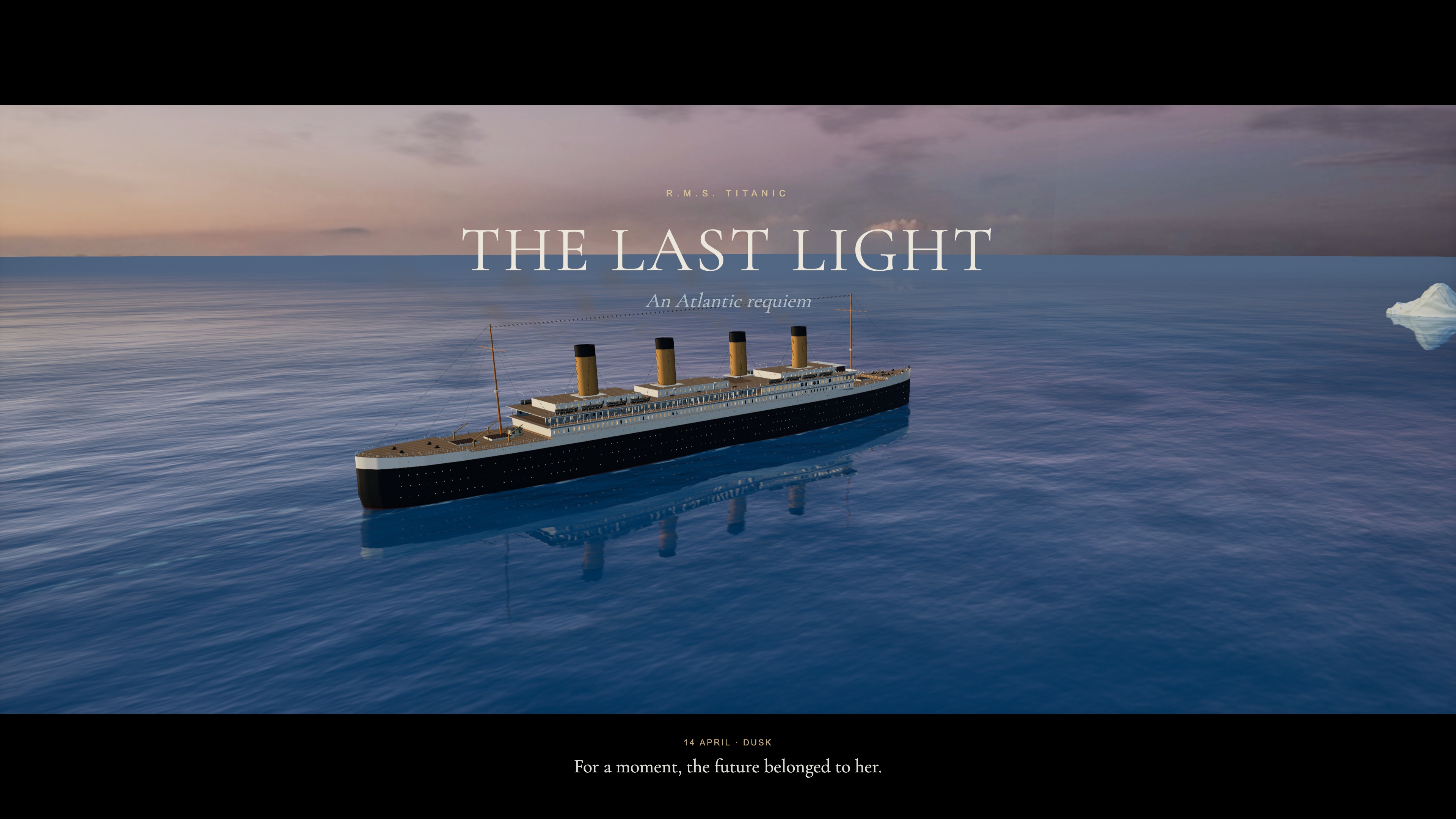
A starting brief based on the creator's public project, not a verbatim original prompt. Your result will vary.
Reconstruction specification based on the commissioned, browser-tested source project and its deep-Atlantic revision. It is not a verbatim prompt from the reference author.
Titaniccinematic 3DoceanTripo P2interactive film
The prompt
1. Project goal
Create TITANIC — THE LAST LIGHT: an interactive, 264-second cinematic voyage from the ship’s final sunset through collision, evacuation and sinking to a dawn memorial. Visitors watch a directed film, explore its moving 3D world, jump to a chapter, save a still or download the complete movie. Present it as an artistic interpretation, without claiming forensic accuracy or official affiliation.
2. Visual direction
Use a restrained cinematic palette: warm cream and amber ship lights against deep Atlantic blue, followed by a dark star-lit night and cool dawn. Render a perspective scene with a 2.39:1 movie composition, soft bloom, subtle grain and vignette. Use depth of field for character portraits and dawn, while keeping distress-rocket particles sharp. Give the ocean a deep-blue body colour, world-space swells, smaller mipmapped ripple normals and Fresnel reflections; warm sunset colour belongs mainly in reflected light. Use hull-attached wake ribbons following the same ocean displacement, with soft ends and broken foam. Wrap panorama textures horizontally without a fract discontinuity to prevent vertical sky seams and reflected streaks. Avoid orange shallow-water shading, tiny uniform ripples and glowing circular foam decals. Remove hidden overlapping roof top faces to prevent depth fighting; use a camera near plane appropriate to the shot distance. During sinking, dim window light monotonically rather than adding high-frequency flicker. Use a quiet serif title, bilingual English/Chinese controls and a narrow timeline along the bottom.
3. World, geography and camera edit
Use one continuous coordinate system with a 269-metre vessel, bow facing +X, and an iceberg fixed at (275, 0, 57). The vessel advances, contacts the iceberg at 96.727 seconds, coasts to a stop, then sinks in fore and aft sections. Keep the iceberg present through the ending and visible in the dawn composition. Retain six chapters beginning at 0, 63, 110, 163, 211 and 241 seconds.
Build 23 deliberate shots. The bow embrace spans 29–61 seconds: an establishing approach, a close double portrait, a view from behind toward the sea and an oblique portrait. Place Rose in front and Jack behind her at the forward tip, both facing out over the bow. Maintain sunset lighting through the sequence. From 127–158 seconds, use three shots attached to a lifeboat’s actual world transform: departure from the boat deck, a closer view of passengers and suspension ropes, and approach to the water. Follow with wide evacuation, listing, fracture and sinking shots. At dawn show the surviving boats with the iceberg in the distance, then a restrained memorial title.
4. Asset inventory
- titanic-vessel: build the 269-metre primary structure in Blender with continuous well decks, a closed forecastle, layered promenades, four hollow raked buff funnels, black upper hull and red lower hull. Use real circular rims for 864 portholes and frames for 360 windows. Restrict emission to actual glazing materials. Batch materials and split at x=-32 for sinking. Add masts, rigging, davits, falls, bronze propellers and rudder. Generate a P2 companionway with teak doors and brass details, normalize it and reuse it twice on the authored deck. Preserve node transforms when assembling the GLB.
- atlantic-iceberg: one irregular, eroded blue-white iceberg, with layered frost, roughness variation, a subdued normal map and a convincing waterline. It remains a fixed geographical object.
- lifeboat: one White Star rowing lifeboat with a white wooden shell, dark gunwale, benches and oars, instanced across sixteen independently moving boats.
- bow-embrace: an isolated double-character asset inspired by the requested 1997 film costumes and pose: Rose with auburn hair, navy/ivory clothing and a patterned shawl, arms extended; Jack immediately behind in a dark coat and ivory shirt. Generate clean full-figure reference images before conversion to H v3.1, keeping each figure’s head, neck, shoulders and clothing coherent. Refine Rose with a separate close-up reference and H facial-detail donor: register eyes, nose, lips and chin, transfer local shape and colour to the continuous full-figure mesh, and blend and retouch the UV transition. For Jack, generate a clean portrait with natural skin colour and defined eyes and lips. Keep its complete head and upper neck, fit gaze and scale to the H body, conform the lower neck and weld both boundary loops. Bake and retouch the narrow neck transition without flattening facial detail. Correct stance and hand contact in Blender. Inspect front, side and rear views for dark smears, texture seams, holes, cut edges and garment intersections. Give skin and cloth separate shading. Preserve natural base expressions with restrained body and cloth movement; do not imply a facial animation rig unless one is actually implemented.
- seated-woman and seated-man: separate adult passenger models in 1912 clothing and pale cork life jackets, seated with bent knees and hands on their laps. Share geometry and materials across boats; vary placement and orientation slightly. Use reversible per-boat instance counts for boarding.
Use Blender for the primary vessel, Tripo P2.0 for the deck companionway, iceberg, boats and seated passengers, and H v3.1 for the two complete hero figures and close-up portrait refinements. Keep the ocean, sky blend, stars, lighting, smoke, distress rockets, foam, spray and debris as scene effects. Supply lighter web model variants with compressed textures and retain detailed source assets for editing. Use the same approved optimized hero pair for the website and offline film export.
5. Playback and feedback
Show real loading progress for essential ship, boat, sky and sea-normal assets. Enable the opening button when the first scene is ready; defer the other models and music. If a required character or iceberg model is late, hold at its scene boundary and resume when it is ready rather than silently skipping its shot. Audio begins after user interaction.
The timeline must support forward/backward seeking and rapid drags without resetting to zero. Preserve play/pause and mute state while seeking; do not let the old audio clock overwrite the requested position. Serve byte ranges for MP3 and MP4. Chapter navigation includes direct entries for the bow embrace at 29 seconds and lifeboat lowering at 127 seconds; these restore the director’s camera while preserving playback state.
Exploration allows orbit, drag and zoom while the world, vessel and soundtrack continue. Follow vessel translation without snapping the viewing direction. Pause remains independent; returning to the film preserves current time. Space plays/pauses, arrows jump ten seconds, M toggles sound, E toggles exploration and F opens fullscreen. Support touch orbit/pinch and timeline tapping.
Boats start empty. Passengers board in staggered groups after 112 seconds and finish before each boat descends. Ropes run between moving davits and the actual boat attachment points, then disappear after release. Backward seeking restores earlier occupancy and rope states. Collision must coordinate hull/camera vibration, ice chips, scraping spray and a steel/ice sound transient. Distress rockets use white burning stars, short individual trails, gravity, drag and fading smoke. Sinking disturbances are irregular, wave-following patches that decay gradually; distribute spray along the stern’s true waterline, never from a remote point fountain.
6. Technical implementation and deliverables
Use Vite, JavaScript modules and Three.js with deterministic time-based animation. Separate camera/timeline, vessel assets, characters, environment, effects and scene readiness. Share the same time model for web playback, seeking and offline capture. Keep web rendering within an explicit pixel, reflection and shadow budget; defer heavier ambient occlusion to the offline profile. Compile and decode assets without a long blocking startup prewarm. Host scripts, models, images, fonts and audio on the same origin and keep secrets out of the static build.
Use an original score and paid ElevenLabs Foley: a complete natural whistling firework take split at its actual airburst into an ascending flight and a sharp bang with crackling tail, steel/ice contact and scrape, lifeboat ropes and water contact, hull strain/fracture, and stern water displacement. Export source WAV files, retain prompts/history IDs, and edit them into timed cues. Align launches at 119, 151 and 183 seconds, with the airbursts 3.15 seconds later. Retain the original burst attack and briefly duck the orchestral score. Keep quiet sea, wind and engine ambience beneath the mix. The reference film soundtrack is not included without authorization for both the public website and downloadable film. Document actual asset and sound sources rather than describing a fallback as a service-generated asset.
Provide a deterministic export of 6,336 frames at 3840×2160 and 24 fps with three temporal samples, burned-in English titles and a 2.39:1 letterboxed image. Encode a 4K H.264/AAC master and a 1080p web edition below 100 MiB, both 264 seconds with 48 kHz stereo audio. Preserve optional Chinese/English subtitles, the audio master and editable source. Publish the static build through the existing CMS Web Pages hosting, without adding a platform application or a per-page Worker.
7. Acceptance
Inspect the opening, both character portraits, collision, distress rockets, all three lowering shots, fracture, stern disappearance and dawn. Check that the iceberg does not vanish at 244 seconds, the sea reads as deep blue, the sinking has no regular white rings, characters remain present in their authored shots, and boat ropes/passengers stay aligned throughout lowering. Test delayed model loading, forward/backward seeking, quick scrubbing, pause/mute, dynamic exploration, direct close-up entries and touch emulation. Verify every exported frame, fully decode both films, compare the actual browser download with the delivered file, and verify the public build and CMS association. Distinguish browser mobile emulation from testing on a physical phone.
How to use this prompt
01
Start with the right workspace
Open your preferred coding assistant or 3D tool. Use the model shown on the example as a starting point, and check any linked project for setup instructions.
02
Choose one thing to change
Swap the subject, art style or setting. Keep the camera and interaction clear. Build a small version first, then refine one detail at a time.
03
Give the scene its own assets
For a custom character or prop, create a 3D model from a short object description or reference image, then bring it into your project.
Previews belong to their respective creators. Check the original source and project license before reusing code or assets.